What Type of Marketer Are You?

May 18, 2010

After interviewing many marketers for different positions at my company and meeting marketing professionals regularly at events, I came to the conclusion that there are two types of marketers:

  • Passionate Marketers
  • Job Marketers

The first group is comprised of those that, as the name suggests, have a real passion for marketing. They read about marketing, they talk about marketing outside work, they go to events and try to educate themselves. They often participate in discussion forums and might even have a blog. Everyone in the family knows they do marketing, friends ask them for some advice and they often times talk to telemarketers trying to sell newspaper subscriptions at eight o’ clock at night because they think it’s fun. Telemarketers often regret the call because the passionate marketer keeps analyzing their sales pitch instead of buying something.

Job Marketers are, unfortunately, the majority out there. I’m not sure whether it starts in school, their first full time paying job or it’s just the way they are. This bunch sees marketing only as a job. If they were offered more money to create TPS reports they would switch to doing it in a heartbeat. Outside work they don’t want to check out a blogabout the newest lead nurturing technology, or fly out to attend a marketing conference. They see these activities as “work” and as such, shouldn’t be performed after 5:29pm.

Funny thing is, Passionate Marketers are not necessarily better at marketing than Job Marketers. Both can be very effective at what they do.However, from what I’ve seen, passion makes some rise quicker through the ranks and get accolades, while the simply “employed”stay for years at the same company and position because, hey, that’s just a job.

When hiring someone for a marketing position, it’s important to know these different types exist. Hiring marketing people is tough enough as it is, one has to understand the type of person they need for each specific position. If you want a marketing assistant that will be still with you 30 years from now, a Job Marketer may be just what you need. Who do I want to work with? Passionate Marketers. From interns to the VP. Not that the other group wouldn’t be fun (after all this is a characteristic about how they feel towards marketing in their careers, not their personalities), but when you have people who are passionate about what they do, it tends to rub off and the whole team benefits. We need more people who are passionate about what they do.

What type of marketer are you?


Taming Your Brand Mascot

May 10, 2010

From Tony The Tiger, Trix Rabbit and Energizer Bunny to Ronald McDonald and even John McCain (?!) brand mascots are a common tool to promote your product or service. More recently even Twitter mascots have been showing up as a company’s public face.

The good ones are those that you don’t even think about until you decide to wear your marketer hat. That’s what makes them memorable.

A recent article I read on Harvard Business Review, “ Aflac’s CEO Explains How He Fell For The Duck” made me think about brand messaging and the use of mascots. The article is great because it gives you an insider’s view of how the famous Aflac duck came to being and the challenges Aflac’s CEO had to overcome to get it adopted.

The first Aflac duck debuted in 2000. The company reported $9.7 billion (US and Japan combined) that year, up $1 billion from the previous year. In 2008, revenues were up to $16.6 billion. Amos credits this increase mostly due to the branding initiatives related to the duck, an amazing feat for any brand mascot. Here are some highlights of the Aflac duck’s impact:

  • First year after the duck’s introduction, sales were up by 29%.
  • Name recognition increased 67% after two years of running the commercials. Today the name recognition is 90%.
  • The duck has 165,000 facebook fans in the US.
  • In two months 100,000 people posted spoofs of the Japanese duck’s song online.

How do you create a successful brand mascot? I particularly like the tips a FastCompany article, “Brands with character”, gives:

  1. Give the brand human traits
  2. Create a life, backstory to your character/mascot
  3. Plan for the long run
  4. Don’t overcomplicate

What mascots do you consider memorable and why?


Explaining Social Media

May 7, 2010

If you need to explain what social media is and the impact it can have in your company or industry, the slideshow below might help. The presentation is not only funny is also engaging.

Rule 1: Listen

Rule 2: Engage

Rule 3: Measure

And my favorite quote is “Don’t assume social media is the answer to everything”.

Enjoy!


The Online Guide for Email Marketing Resources

April 26, 2010
I am often looking for best practices, reports and other resources on email marketing and end up exchanging what I have written down on pieces of paper with other marketers at conferences or online, so I’ve decided to publish here my entire list of resources I found on the web for all things “email marketing”.

This is a good list but not meant to be all inclusive, I am definitely missing a few good sites. Please let me know which ones you think should be included and I’ll update this resource page.

Articles, Best Practices, Links About Email Marketing
Email Benchmarks and Industry Statistics (mostly free)
Notable Email Marketing Blogs
Blogs worth checking out, both from vendors and independent sources (in no particular order):
Email Marketing Training
The following are some training programs on email marketing. Note that some are paid. Email marketing vendors and ESP (Email Service Providers) sometimes have good free online training on their sites that although usually slanted towards their offerings can give newbies a good overview of the basics.
Conferences and Events
Although there are many marketing conferences out there, very few focus almost exclusively on email marketing. Below are the few that stand out.
Email Marketing Vendors
Below are the most well known email marketing vendors listed in alphabetical order.

Did I miss any good resource you’d recommend? Let me know!


Why Social Media Needs to Die

April 14, 2010

OK, this may be a bit harsh, but all the talk about social media versus traditional marketing is driving me crazy. Sure, gurus, experts, and agencies alike want to tout they are the latest and greatest when it comes to the new marketing tools on the block and so it makes sense for them to brand themselves as “social media agencies” or “social media experts”. But what about the “traditional marketing” as they call it? It’s all the same thing, but with different adjectives.

Trends and the Obvious

Isn’t it funny how some numbers on a screen, a nice chart and statistically sounding papers can make you believe in anything at all? I found it amusing when reading about two new surveys about social media adoption were released that some of the highlights were:

  • Companies are spending more on social media and plan on increasing social media budget
  • Companies are switching more money from traditional marketing to digital marketing
  • Small and large companies alike are turning to social media
  • Social media is becoming a viable took in the marketing mix

Let’s say someone just came out with this new thing called the Television. And not only that, after a few years it is now in color and families are gathering around it for their favorite shows. Wow, you may say, let’s jump into that and get our own commercial there! Social media, like any other tool (or vehicle of communication to be exact) is the same thing. The new shinny object is obviously attracting people to it and the more you try it out, the better you’ll be at mastering the right message.

Another obvious trend being reported talks about how companies are integrating social media into their marketing efforts (a couple of reports discussed here and some discussion here too). Really?! Wow, these marketers must be really smart to be integrating social media… but how about the ones that say they haven’t integrated social media into their marketing mix? Are they losers? Maybe they are still trying out the waters, creating a twitter account to listen to the market before jumping right in. This “integration” talk is another useless discussion because it really doesn’t help you do anything better today. So what if most marketers are not integrating social media into their strategy? How can this data help you? Don’t tell me that you need that to “sell social media” internally into your organization because that’s a lame excuse. Agencies might like the data because it tells them how easy or how hard it will be to sell their new “social media” strategy service.

The Academic Debate No One Cares

I think I had enough of the whole social media versus marketing discussion when I listened to the Six Pixels of Separation Podcast talking about digital marketing agencies vs. traditional marketing agencies vs. social media agencies.

I wholeheartedly agree when Mitch Joel saysLet’s not make it bigger than it is.”

The discussion of where social media fits, and whether is part of marketing or not is purely academic and has no practical purpose.

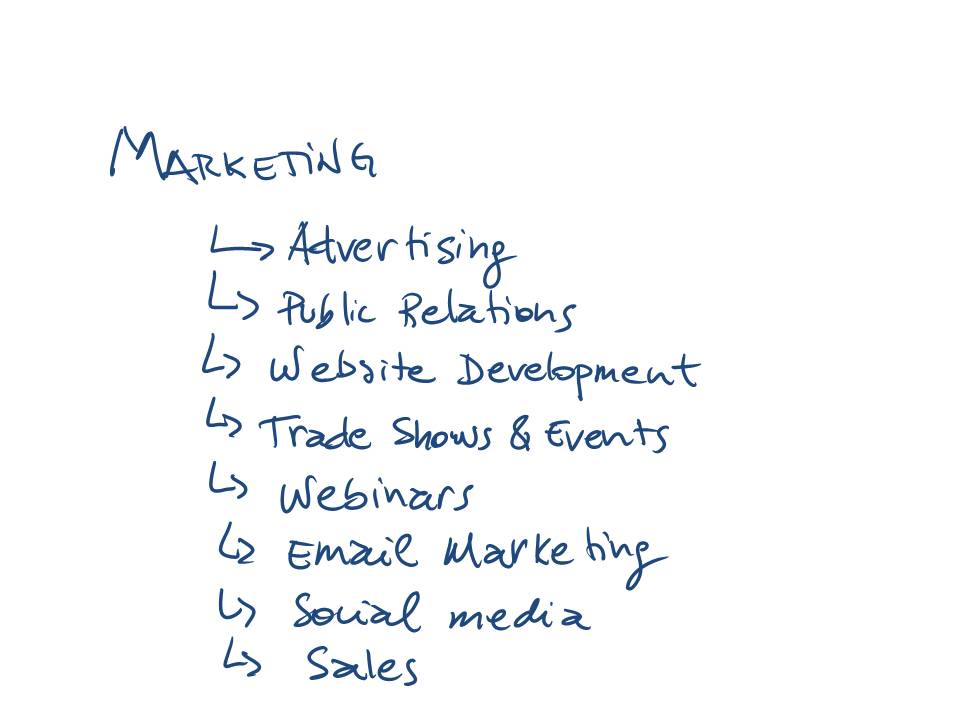
For those not in the marketing field, let me clarify this with the simple diagram below:

Marketing components

All of those items are under ‘marketing’. Yes, even ‘sales’ is part of marketing, that’s how we’re taught in school and how it is in the real world. In fact, books such as “Marketing Management” and “Principles of Marketing” by Philip Kotler widely used at marketing courses talk about the good and old “Four P Components” of the Marketing Mix and have as examples the following:

  • Product: product variety, quality, design, features, brand name, packaging, etc.
  • Price: list price, discounts, etc.
  • Promotion: sales promotion, advertising, sales force, public relations, etc.
  • Place: channels, coverage, assortments, locations, etc.

No, they don’t mention “webinars” or “email marketing” or “facebook” but you get the idea. Those are all tools of your marketing bag.

And Now For Something Completely Different

While many are using the term social media in everything they do, I propose something different:  just kill it from your vocabulary. You can argue about “push versus pull”, about how “inbound marketing” is the new thing and all that great stuff but keep in mind that it is all part of your marketing strategy and execution.

Talk about “integration”, about “traditional vs. new”, or “digital vs. virtual” doesn’t get you anywhere.

I know I’m not alone in trying to end the social media vs. marketing dichotomy and know that a lot of you marketers out there are getting tired of this whole thing, so let’s just try something completely different and stop talking about social media as if it were completely separate from what we do on a daily basis. It’s a tool, so let’s refer to it as one.


B2B Email Design – Gallery 2

March 17, 2010

Last week I started an email design gallery containing a series of HTML emails I received. This post is another installment of the “gallery” concept so that you have more designs to review and use in your own creative process. Is good to see what’s out there, what is working and what is not. The emails in these galleries are mostly B2B marketing in nature, but the design principles can be applied to B2C as well.

Note: The emails are in no particular order and the senders were selected at random from a variety of emails I get. Click on the images for larger version.

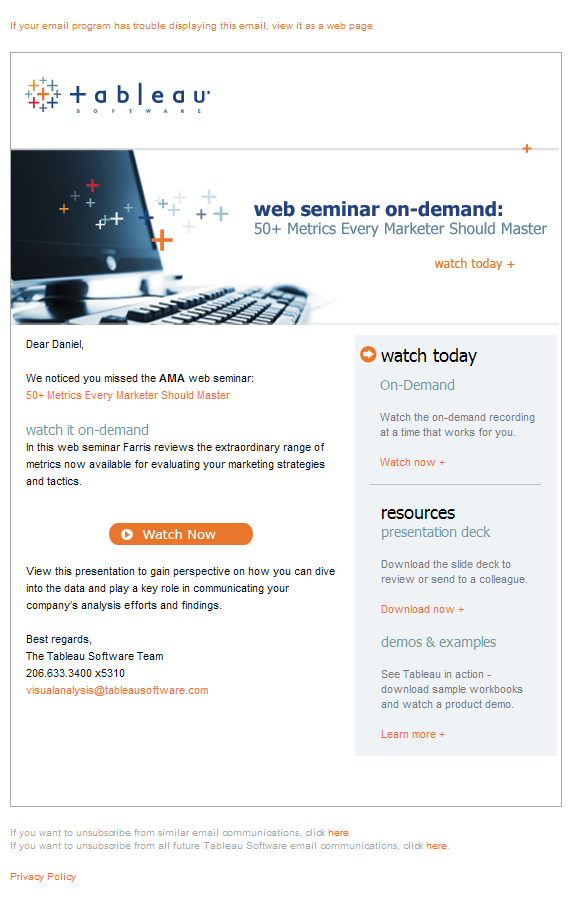
Design #11

  • Email Sender: Tableau Software
  • Email Title: 50 Metrics Every Marketer Should Master

  • What I Like: Small but visible logo on top left identifies the company immediately. Clean header graphic with big and concise title. Short copy. Right side bar with useful links related to the webinar.
  • What I Don’t Like: Copy is a bit too short… I did register for the webinar and missed it but it could have a bit more copy enticing me to go on and watch it on demand.

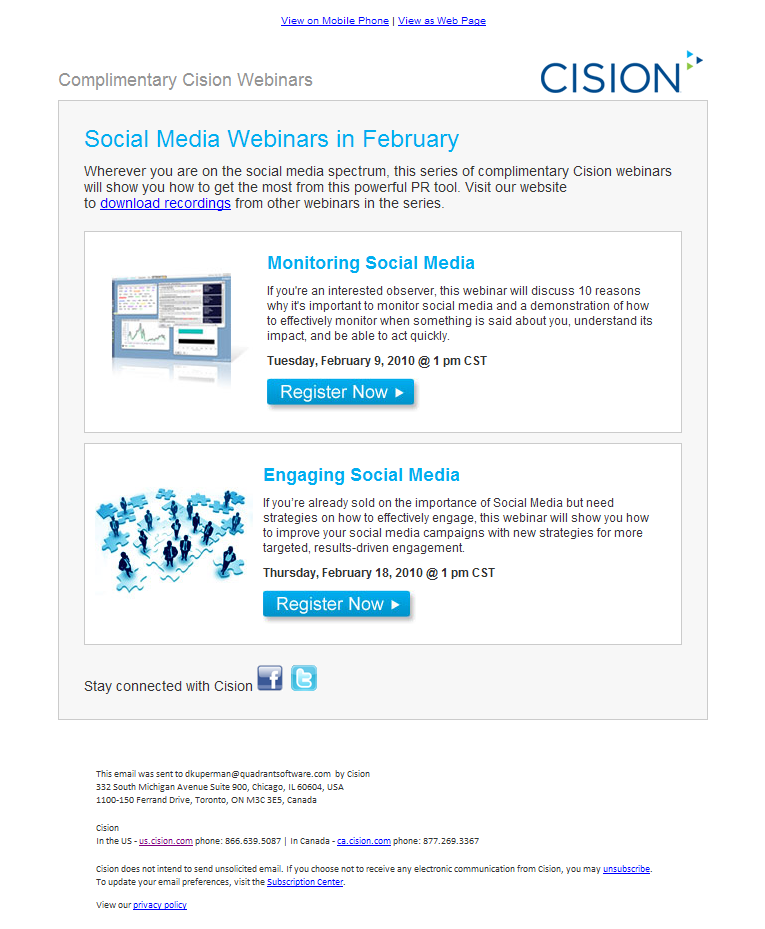
Design #12

  • Email Sender: Cision
  • Email Title: Discover the secret weapon

  • What I Like: Header graphic ties into the title of the webinar. Big blue lead in. Good use of bullets and of bolding of words within the bullets, drawing reader’s attention to them.
  • What I Don’t Like: Three different font sizes in the header graphic. The “sign up today” hyperlinked text at the bottom looks out of place, not sure if because of font size but doesn’t seem to fit within the design.

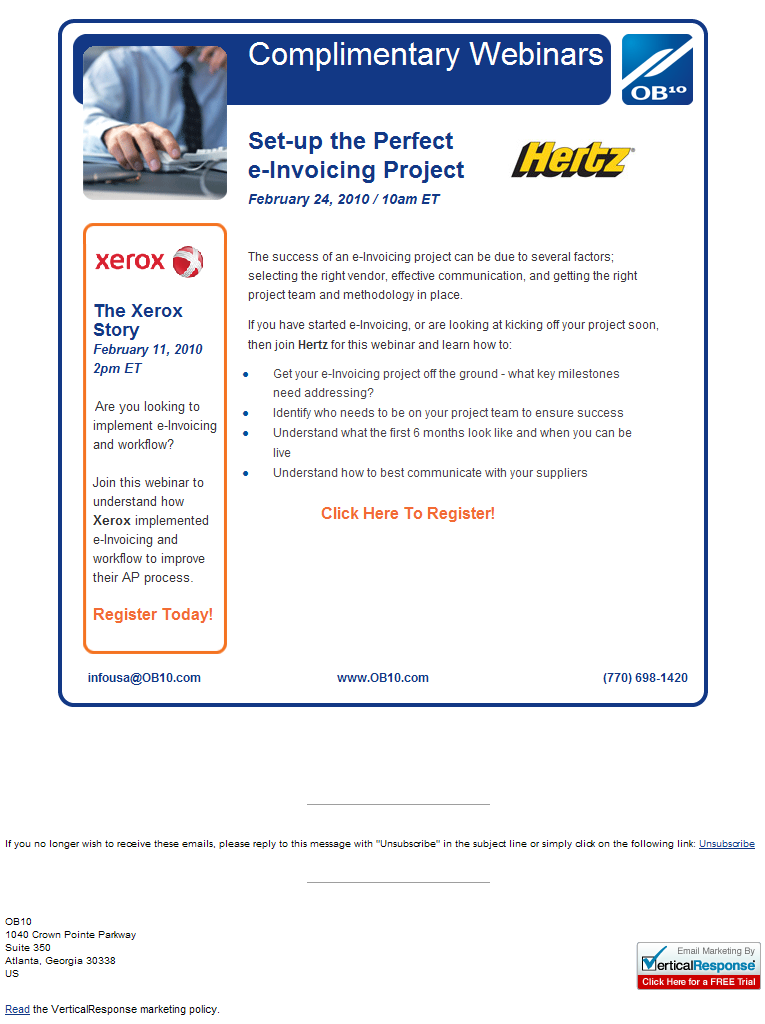
Design #13

  • Email Sender: OB10
  • Email Title: Setup the Perfect e-Invoicing Project

  • What I Like: Logos for Hertz and Xerox calls attention. Clear and concise title tells you right away what the subject of the webinar is about.
  • What I Don’t Like: Image used at the header (top left) is one of those generic stock photos that don’t add much to the message. Copy has nothing to do with the Hertz logo. I look at the logo and think it will be something about how Hertz did their e-Invoicing project but the copy doesn’t address that. Left side bar with Xerox logo talks about another webinar, which could be confusing. What do you want people to do after all, register for this one or for the other one?

Design #14

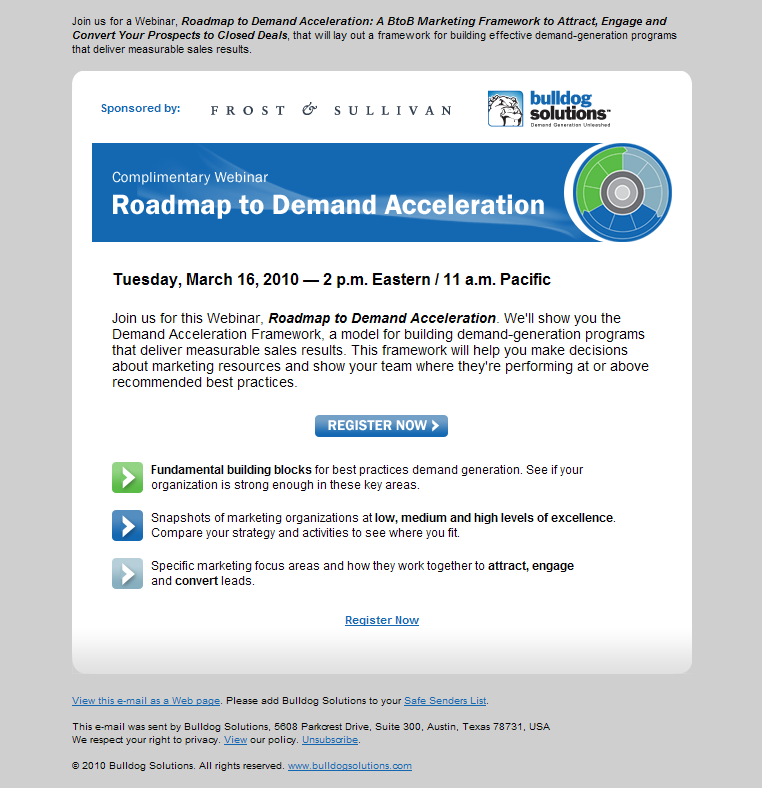
  • Email Sender: Bulldog Solutions
  • Email Title: Roadmap to Demand Acceleration

  • What I Like: This email was optimized for Outlook as you can see by the very top of it containing plain text. Sure, it may not look that good when you open it but if you’re using MS Outlook with “preview” or with images off, then you can clearly identify what the email is about. Simple but strong header graphic with webinar topic. Good balance between copy and design elements.
  • What I Don’t Like: The words they use in bold at the bottom are completely opposite to what I would have bolded.

Design #15

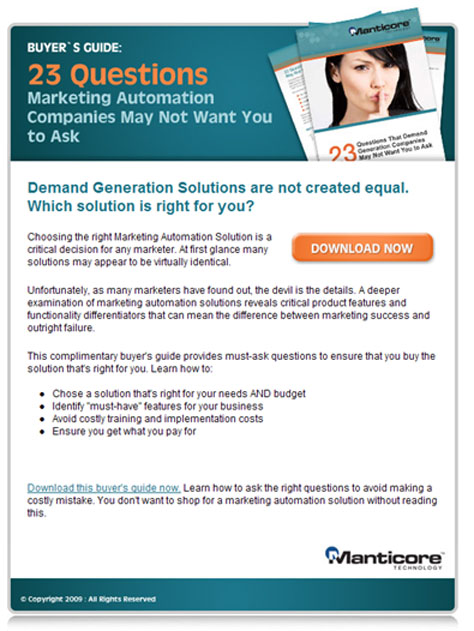
  • Email Sender: Manticore
  • Email Title: 23 Questions Marketing Automation Vendors Don’t Want You to Ask

  • What I Like: Big attractive header graphic with compelling title and nice “hero shot” of the buyer’s guide being offered. Compelling lead in. Concise bullet points.
  • What I Don’t Like: Seems to have too much copy, I get discouraged from reading it just by opening the email. Copy takes too long to get to the point of what the buyer’s guide is about. There seems to be a weird white space between the last bullet and the final paragraph.

Next I’m thinking about reviewing some email subject lines, because your email design won’t matter if the recipient doesn’t even get to open it!


Email Design Review Gallery

March 9, 2010

Are you tired of what your marketing emails look like? Are you in search of inspiration? Or just want to see what’s out there? Well, this post may be the answer!

Whenever my team talks about changing the design of our email campaigns, we start off my talking about emails we received in the past and that we liked. We also spend some time talking about the emails we hated and those that could be improved. We come out with a list of things to think about and that we could be using in our own campaigns. Is always good to see what’s out there to give you some ideas.

After searching a bit on the web I couldn’t find any “email design gallery” or something like it that would show me different email designs. Sure, our email marketing software has some canned templates but they are very bland. I was looking for some real-life good looking HTML emails I could use as a reference. So I decided to create one and share with you.

This is the first post of a series that will show you some marketing emails (webinar invitations, whitepaper downloads, product announcements, etc.) so that you can take this back to your team for your very own email marketing brainstorming session.

Note: The emails are in no particular order and the senders were selected at random from a variety of emails I get. Click on the images for larger version.

Design #1

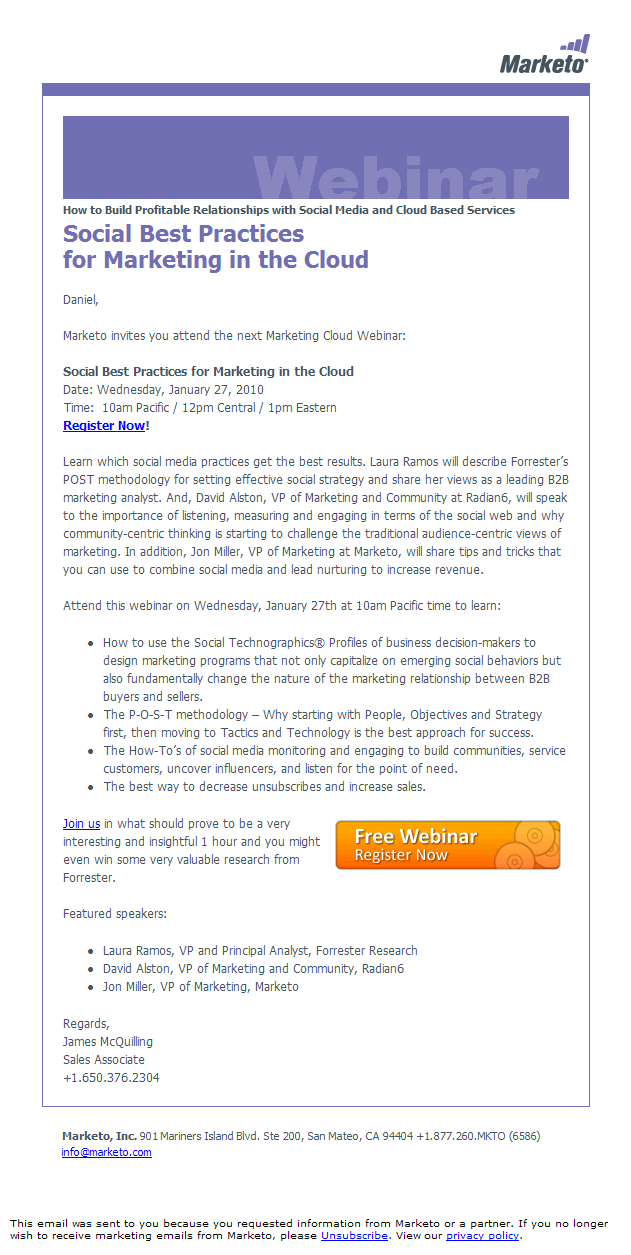
  • Email Sender: Marketo
  • Email Title: Social Best Practices for Marketing in the Cloud

  • What I Like: Clean design; date and time of the webinar on top easy to find; orange “Free Webinar” button calls attention to the important action (register now!)
  • What I Don’t Like: Purple graphic on top (Webinar) doesn’t seem to add much to the content; text-heavy email with little break between paragraphs may discourage people from reading it

Design #2

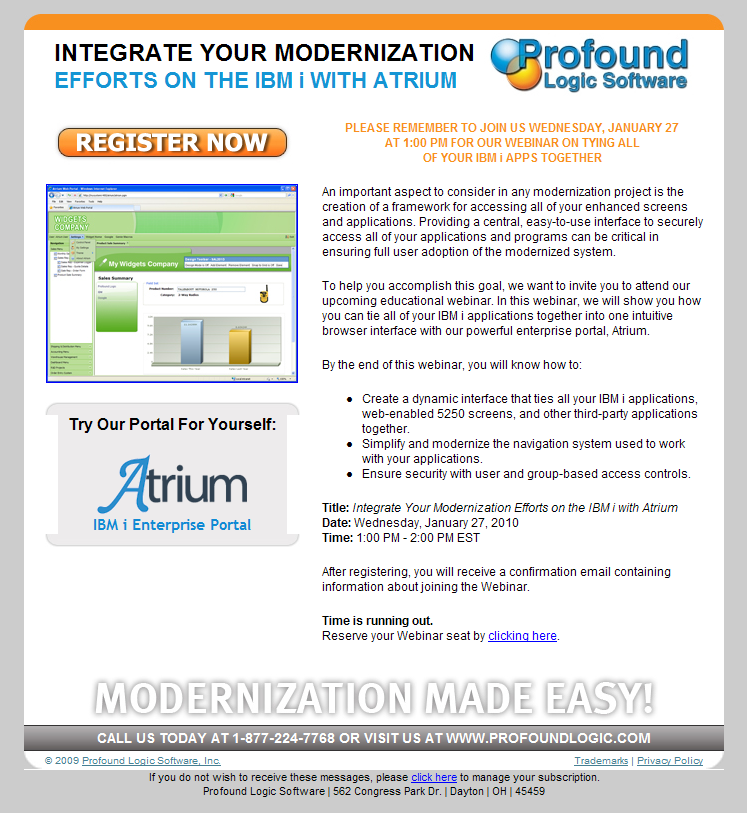
  • Email Sender: Profound Logic Software
  • Email Title: Integrate your modernization efforts on IBM i with Atrium

  • What I Like: Well, its colorful I ‘ll give them that. And there’s a big orange “Register Now” right on top so whatever this email is about I know they want me to register.
  • What I Don’t Like: Too busy, too many things happening in this email that makes it very distracting. I had to read it a couple times to understand what the title was because my eyes kept bouncing around. My eyes go straight to that screenshot before I read the copy and so I have no idea what that shot is about. You are really hoping people stop and read the text, which may not happen all the time.

Design #3

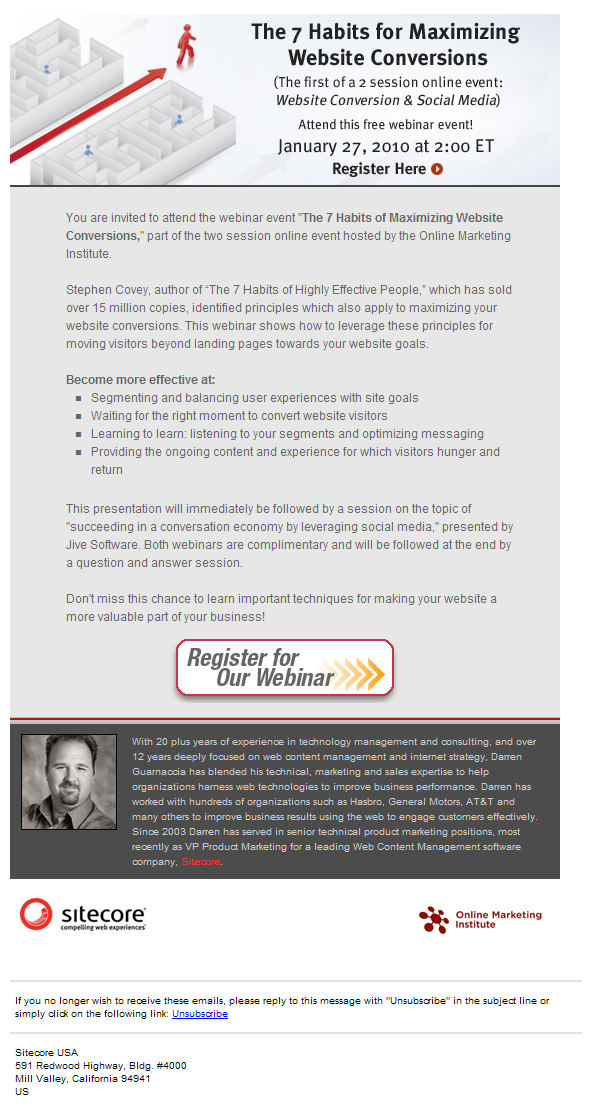
  • Email Sender: Sitecore
  • Email Title: 7 Habits for Maximizing Website Conversions

  • What I Like: Catchy header with interesting graphic, clear title and date/time of the webinar easy to find. Big “Register for our webinar” button at the bottom makes it easy to find where to click to sign up. Picture of speaker gives it a personal tone.
  • What I Don’t Like: Although the header graphic is good, it could be a bit cleaner (I’d remove the mention of 2 sessions and increase the title a bit); Grey text over grey background doesn’t make it ‘pop’.

Design #4

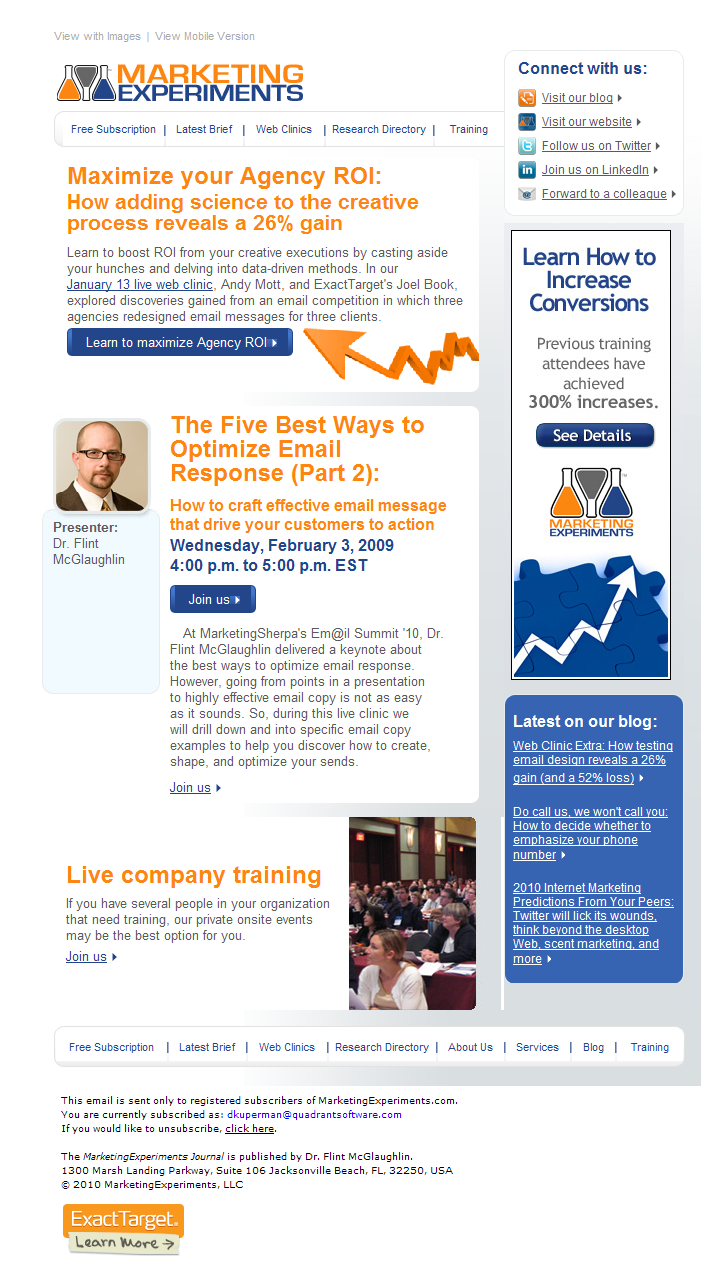
  • Email Sender: MarketingExperiments
  • Email Title: No idea

  • What I Like: The blue and orange colors go really well with the white background. The picture of the speaker gives it a personal feel. Side banner is a good way to try “sell” additional product and increase registrations.
  • What I Don’t Like: Being an email from MarketingExperiments I was expecting it to be much better. This email is cluttered, is very difficult to determine what exactly are they trying to get me to do. How many webinars are being advertised here? And what’s up with blog posts (side bar) in this email? Too confusing. I think the only good thing going for them is that their name is recognizable and so people may spend some time deciphering their email.

Design #5

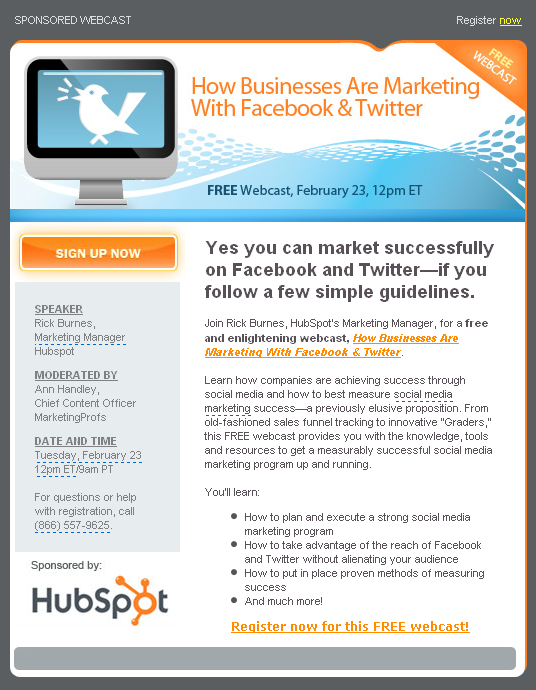
  • Email Sender: MarketingProfs
  • Email Title: How Businesses are Marketing with Facebook and Twitter

  • What I Like: Really great color combination makes it easy in the eye. Clear header with big title and date/time of the event. Orange “Sign up” button on top left corner is the natural place for your eyes after reading the header and calls attention. Big but concise lead-in. Sponsor logo nicely placed helps give authority to the email.
  • What I Don’t Like: Bullet points could have been more concise; left side bar is grey on grey background which makes it difficult to read.

Design #6

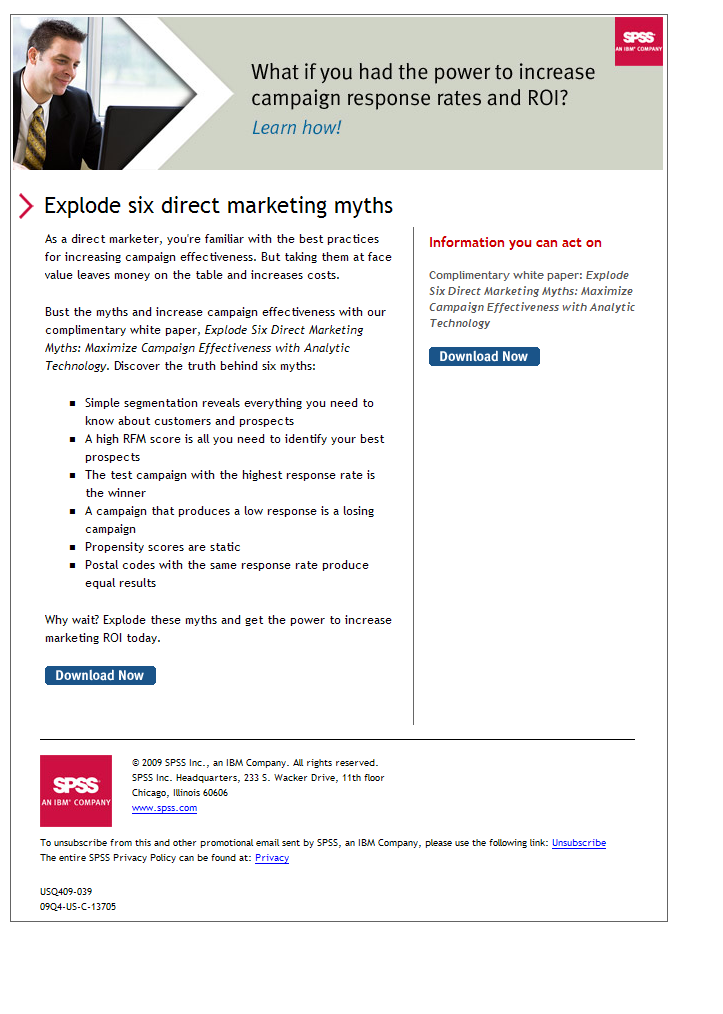
  • Email Sender: SPSS
  • Email Title: What if you had the power to increase campaign response rates and ROI?

  • What I Like:Cathy header and good combination of graphic with text to get people interested. Not copy intensive and good use of bullet points. Big lead-in helps keep users reading.
  • What I Don’t Like: Lead-in copy “Explode six direct marketing myths” doesn’t tell me much, poor choice of words (although ‘myths’ tend to get people to read). Right side bar basically empty, not helping much. No image of the whitepaper that they are offering (images, or “hero shots”, tend to increase registrations rate).

Design #7

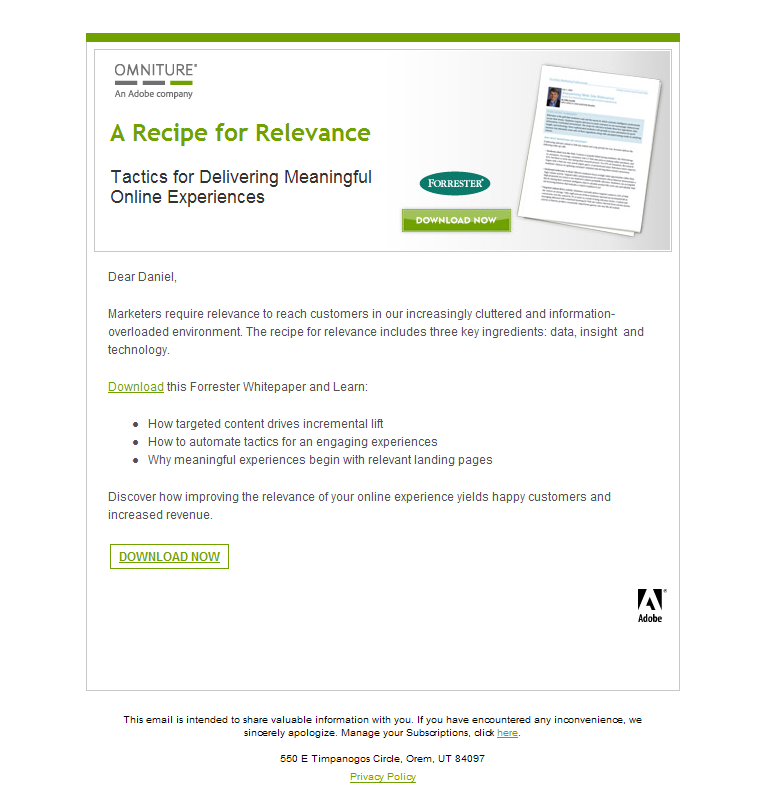
  • Email Sender: Omniture
  • Email Title: A Recipe for Relevance

  • What I Like:Clean, nice looking header containing image of the whitepaper and download button. Very light on copy but direct to the point and making good use of bullet points.
  • What I Don’t Like: The ‘download’ button with the Forrester logo on top and right next to the image looks a bit out-of-place, maybe it’s just me? The copy could have been more precise in explaining exactly what the whitepaper is about, looks to me a bit vague.

Design #8

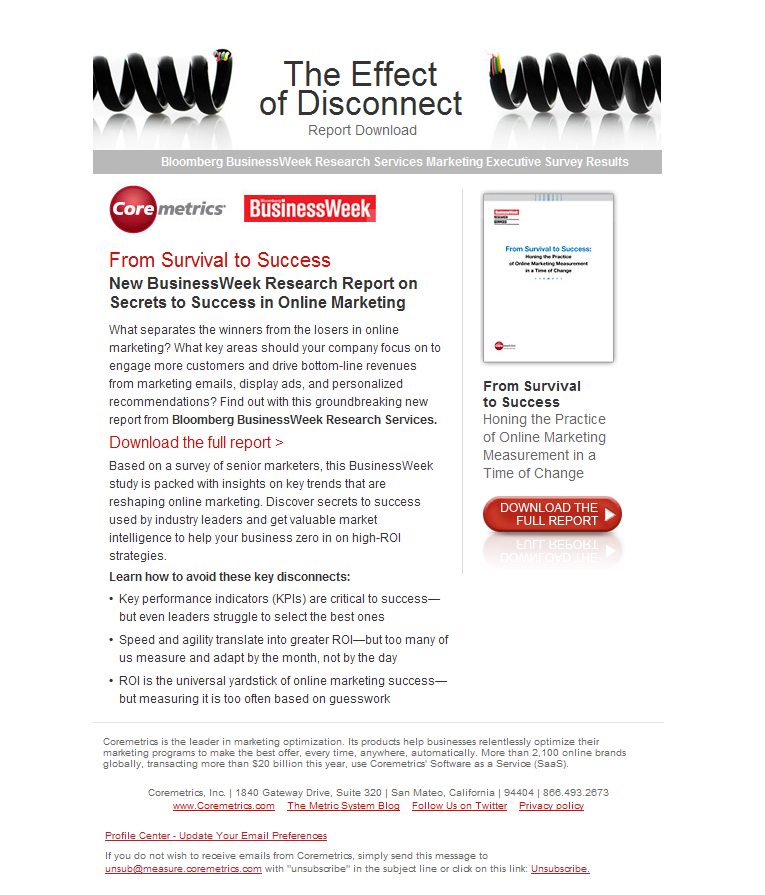
  • Email Sender: CoreMetrics
  • Email Title: The Effect of Disconnect

  • What I Like: The header graphic is not some random image but rather helps drive the point the title is trying to make about “disconnect”. Whitepaper shot on right is the right size (you can read the title of the WP) and right below it is a big red “download the full report” button that you can’t miss.
  • What I Don’t Like: A lot of copy in this email in a space that makes it look cramped doesn’t help the reader. The only “download” link seems to be the red button to the right, I would have added a couple more ‘download’ options either within the text or right after it.

Design #9

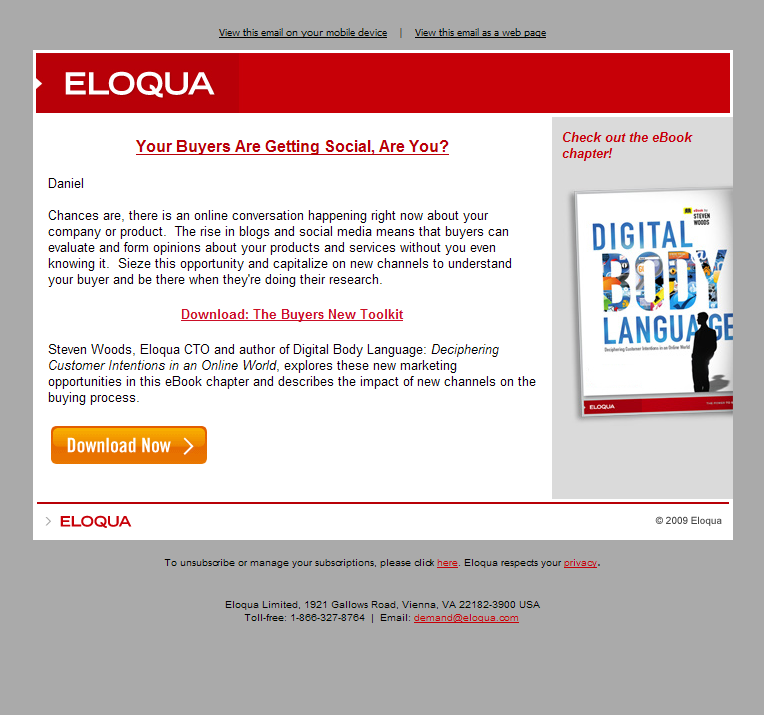
  • Email Sender: Eloqua
  • Email Title: Using Social Channels

  • What I Like: This is a really nicely designed email. Red header with Eloqua name tells me right upfront who’s behind the email, there’s not too much copy, the right side with the book shot catches my eyes immediately and the orange “download now” button is hard to miss, you know right away where to click to get it.
  • What I Don’t Like: Although the email design is pleasant in the eyes, the message is confusing. The big shot of the book on the right makes me believe that when clicking the “download” now orange button I’ll get that book chapter they talk about, but then there’s that other red download link in the middle saying “Download: The Buyers New Toolkit”. So which one is it? The book chapter or this toolkit?

Design #10

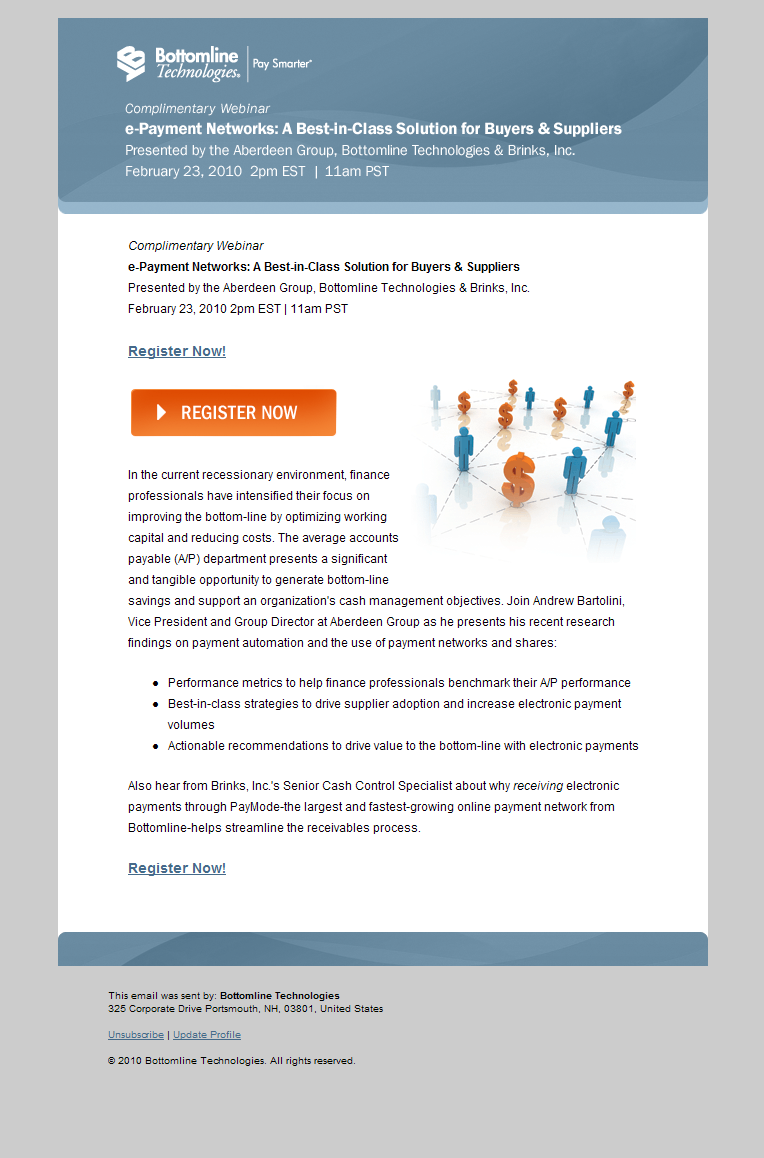
  • Email Sender: BottomLine
  • Email Title: ePayment Networks

  • What I Like: Bit header with the title of the webinar also tells me when it will be held. Big unmistakable “Register Now” button right on top.  Small graphic image to the right helps balance the copy.
  • What I Don’t Like: The paragraph right below the register now button is huge (9 lines), it would have been better to chop it off and make it a bit smaller, especially because the image to the right reduces available space. The copy is good but lacks some emphasis on important points such as the fact that Aberdeen Group will be presenting and a Senior Cash Control Specialist (a customer, maybe?) will be presenting. If they had bolded some of those names it would have drawn attention to that part of the copy making it easier to read and more compelling.

That’s it for this installment of Email Design Gallery. Let me know what you thought of these designs and if you have any to submit, please contact me!


The Dirty Side of Marketing

February 19, 2010

Marketing is Dirty

Recent grads and people from other fields usually have the wrong idea about marketing. After multiple years of interviewing people for marketing positions, working with marketing interns, and discussing marketing with non-marketers it seems that the non-practitioners form their ideas about marketing from:

  • Having watched Mad Men and thinking that  marketing is advertising and it involves coming up with a crazy creative, tough negotiation, and a lot of romance
  • Reading Seth Godin books and feeling like it’s about coming up with purple cows, telling stories, and something about forming a big tribe
  • Watching  the mistakes that SouthwestUAL, Baja Fresh and TGI Fridays, and others have made and then thinking they would  never do that because they are smarter than those big dumb brands
  • Using Twitter and Face book on a daily basis and thinking that just because they have 100+ followers/friends and have top scores on MafiaWars/Farmville/InsertYourAnnoyingAppHere they are experts in social media and think is the only useful marketing vehicle
  • Surfing the web for hours and wondering why don’t all those companies simply re-design their websites

I could go on, but you get the idea.

And then what happens? They get a job.  And with the job comes meetings. And in one of those meetings the  Sales Manager starts talking about quality of leads coming from Marketing, the CFO asks about  Return On Investment, and the CEO  discusses how marketing goals need to be aligned to the overall strategy and asks for comparison with what competitors are doing. Then some negotiation about budget goes on and when the marketing staff regroups there are a lot of spreadsheets being thrown together for metrics.

And those metrics take time. Metrics for email results (clickthroughs, open rates, deliverability, etc.), metrics for the website (visitors, pageviews, clickpaths, conversions, etc.) and for the pay-per-click campaigns (impressions, daily budgets, word rankings, conversions, etc.), and the list goes on. At the end of the day our brave new marketer starts wondering what happened to all the nice marketing creativity, brainstorming sessions, and cool toys he saw on movies and expected to be part of.

The harsh reality is that marketing, let me rephrase that, effective marketing is a dirty job. Sure there is creativity, there is coming up with new ads, a new website, brand discussions and user personas, but it is all backed by serious analytics. Results are what marketers are after. Everything else is a means to that end.

This bucket of cold water thrown at the newbies leave many upset. Our schools are partly to blame because very little practical marketing is taught (recent graduates know the four P’s but have no idea of how exactly to use them and what tools are available). Inevitably some will get disillusioned and leave the field of marketing. Others ‘get it’ and take the analytics side of marketing with gusto and become excellent at slicing data and putting it to work.

With time all that number crunching and metrics become second nature and while they are still important, the “fun” aspects of creative brainstorming, marketing positioning and message, filling walls with post-it notes, and even going to offsite meetings for some R&R before that big push towards a deadline are what you remember most.

To sum it up: Marketing is dirty. Numbers, statistics, and real grunt work is done behind the scenes. But we love it because our work is what makes or breaks a company. We love it!


Lead Conversion Rates Demystified… Not!

January 26, 2010

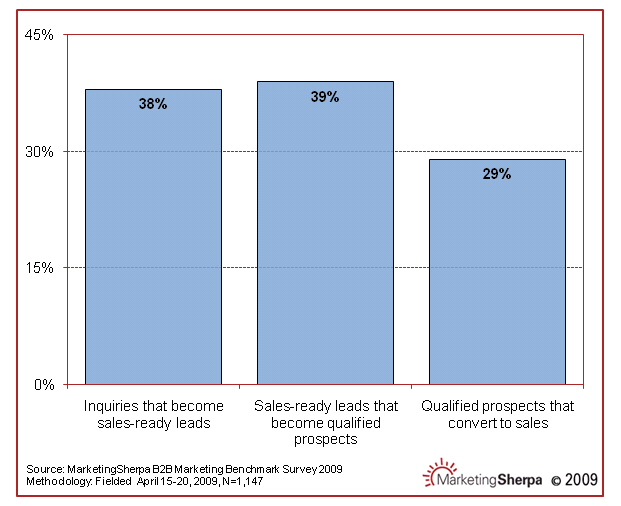
MarketingSherpa recently published a nice chart about lead conversion rates (Note: they give open access to the full article only until Feb 19th). According to their research (147 responses) you need about 10 qualified leads to close one sale.

Lead Conversion Rates

When sharing the chart with my co-workers the responses were varied, from “Great! Now we have the baseline we needed to set our goals!” to “Gee, I guess we should change our lead generation plans” and even “What exactly does this mean?”.

All valid points, for sure, and before trying to interpret the chart how about asking:

  • What industries are represented?
  • Is it B2B or B2C?
  • What are the sales cycle of the respondents?

Those are just the 3 first questions I would ask, followed by a handful more. I did send MarketingSherpa questions trying to get more information and haven’t gotten any response yet.

And how about all the other metrics we see out there (a nice post from Market2Lead about Sirius Decisions Lead Waterfall comes to mind)? Should you take MarketingSherpa’s metrics as the de facto guide or combine them with some others?

The lesson here is to be very, very careful with data presented to you without any substantiating information. Nice charts abound on the Internet and you can find one to back any story you wish. So before you go start changing your marketing plans, calculating how you compare against the “industry average”, and spend countless hours pondering over the meaning of the data, remember that sometimes it just doesn’t matter.

If you can’t compare apples to apples, you might as well just eat the fruit and forget about it! 😉


Choosing an Email Marketing Software

January 11, 2010

Who’s the best email marketing company/software?

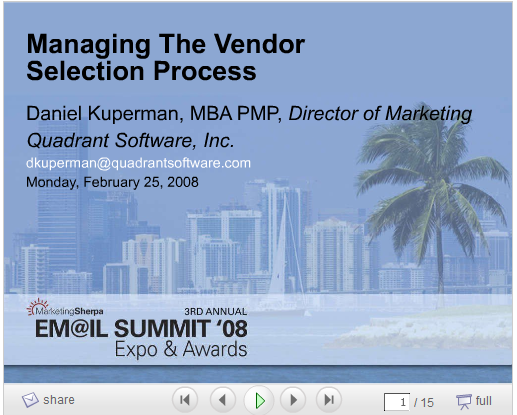
This question on a recent LinkedIn discussion thread for the Technology Marketing Community reminded me of when, a couple years ago, I delivered a presentation at the 2008 MarketingSherpa Email Marketing Summit. Titled “Managing the Vendor Selection Process”, it talked about my experience in selecting a new email marketing software for my company. Slides can be seen below.

Slideshare link: www.slideshare.net/dkuperman/managing-the-email-marketing-vendor-selection-process

The Selection Process

As the Director of Marketing, I had been pressing the company to replace our internal, archaic email system with something that was web-based (an “ESP”, or Email Service Provider, as the industry calls it) and that would reduce the time it took us to prepare, send, and evaluate email campaigns. The process we went through is not necessarily the best or the only way to do it, but it certainly helped put some metrics in place that we could use to evaluate each vendor. With so many options out there, having some kind of analytical basis to back your final choice can help get approval for the new system.

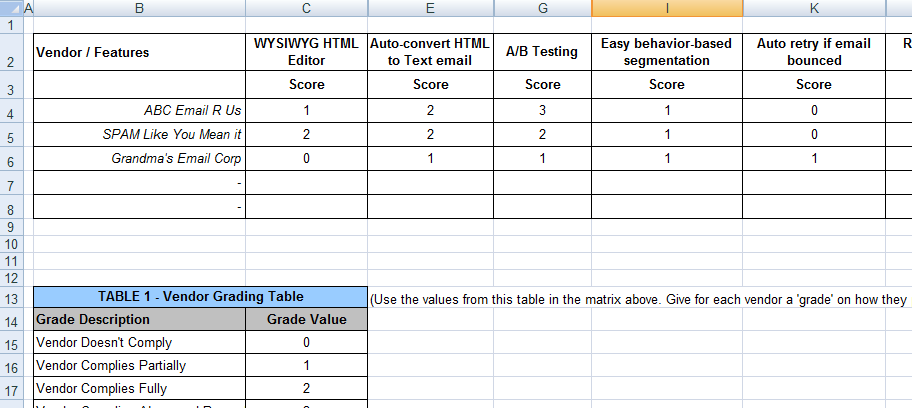
The Vendor Selection Matrix

I created an Excel file to consolidate all info from the vendors we selected so that we could do an analytical evaluation. The matrix helped us focus on how vendors compared on each feature and also gave us the ability to rank vendors based on weighted scoring. Why? Well, because there were some features we considered more important than others and so should you. Just because a vendor has a great way to create dynamic content for newsletters, it won’t matter if you don’t usually send out newsletters. You get the point.

Excel Template for vendor comparison: you can download and use my template as a starting point.

Note: if the download link doesn’t work for you, contact me and I’ll email the file to you.

How to score vendors using the comparison matrix spreadsheet:

  1. List features
  2. List vendor names
  3. Decide on a numbering system for each feature evaluation (if you have multiple people helping you select and evaluation vendors, make sure everyone agrees on what constitutes a “meets feature fully” versus “meets feature partially”). This is to help you differentiate between vendors that offer a similar way to accomplish something but one is clearly better (because it’s easier, or gives more options, etc.)
  4. Decide which features are more important (here’s where the weighted score comes in… give higher numbers for features that are more important)
  5. Score vendors

The best email marketing vendor?

Ha! Good question! This is a question that only you can answer:

  1. Decide what is your goal with the email marketing software
  2. Define key features you really need
  3. Score vendors
  4. Chose the one that most closely matches your needs

How about “soft” qualities?

Yes, the excel matrix may help compare features vs. features, but falls short on so-called “soft” features like technical support, quality of service, and the all too common “gut feeling”. Make sure you take those into consideration, especially on tie breakers. Vendors that score very closely may have some clear differentiators that are not easily measurable. The important thing is to lead with the analytics side before throwing the qualitative evaluation into the mix.

Good luck in your email marketing selection process!