Mapping the Social Media Landscape

August 11, 2010

Infographics, according to Wikipedia are “graphic visual representations of information, data, or knowledge”. It’s also a wonderful way to communicate your message. Marketers that manage to become good at visual data communication can positively influence their companies into taking the right approach or strategy. Talking with the CEO or other managers about what all those metrics mean is sometimes a challenge, especially when they are not on top of the latest marketing trends or technologies.

When it comes to social media, a nice chart can do the talking job for you. The problem is finding the right one. The internet is now full of infographics for the social media space and each has its own particular characteristic. Here are some of the more interesting ones I found that try to map out the social media or social networking landscape. Their creators vary widely, from bloggers, marketing companies, to nationally recognized magazines.

National Geographic’s “World Wide Friends” illustration:

National Geographic Magazine World Wide Friends Illustration

National Geographic Magazine World Wide Friends Illustration

Overdrive Interactive “Social Media Map”:

Overdrive Interactive Social Media Map

Flowtown’s 2010 Social Networking Map:

The 2010 Social Networking Map

Flowtown's The 2010 Social Networking Map

Information Architect’s Web Trend Map 3.0:

Web Trend Map 3

Information Architect's Japan Web Trend Map 3

Harvard Business Review “Mapping the Social Internet”:

Mapping the Social Internet

HBR Mapping the Social Internet

Mapping Social Media and Internet Trends

What I like about the maps above is that each one is a great representation of the data it is trying to communicate. The maps that follow a known pattern (subway lines, political map, etc.) tend to be easier to understand because they represent images we’re already familiar with. In general, if it takes you more than a few seconds to understand what the map is trying to say, then it’s not a good map. Your audience, of course, will be the determining factor telling you whether one type of map is more appropriate than the other.

Have you found a good representation of the social media space? Please share!


How To Practice For A Killer Presentation

June 21, 2010

Whatever your presentation style there is one thing that can make or break your presentation: practice. Unless you practice your delivery of the material, shinny flying slides won’t matter. The question is what is the best way to practice? And is there a right approach?

My Kung Fu instructor usually says that “practice doesn’t make perfect; perfect practice makes perfect”. That’s true for martial arts (no matter how much you kick, if you are not doing it right you won’t be effective at kicking your opponent) and for life in general. I have done my share of presentations to a variety of audiences and groups and have also helped others by giving them feedback about their own presentations. Based on what I’ve seen and experienced, you should get at least one person to listen to your presentation and give you feedback. If you can get more than one person (that friend you helped move his couch should be fair game) is even better. Here’s what you do:

First Round: Go through it without stopping

Ask the ‘audience’ to listen to your presentation without making any comments or interruptions. This first pass will give you a chance to deliver the whole thing live which will give you a good sense of overall timing, the flow, and any major hiccups you haven’t foreseen when creating the presentation. It also helps the audience that will give you feedback to get a good sense of the message you are delivering so that they can later focus on specific details.

After you are done, the feedback should focus on the big things. Was the message clear? How did you do on timing? How were your posture, hands, and voice?

Second Round: Detailed, on point feedback

The second pass will now focus on details of the presentation. You will deliver the presentation again, trying to incorporate that first overall feedback, but now the person(s) giving feedback will stop you at any time they want to give you immediate feedback. So if you are talking about a slide and there’s something wrong with either what’s on the screen or with what you are saying at the time, you will be stopped right there before moving to the next slide or sequence. They will give you feedback about that particular point in your presentation, you will think about it and will deliver that portion again. Yes, this will take time because you will be stopping frequently, so budget your time for this feedback round accordingly.

Third Round: Final, non-stop, full pass

Finally the third round is like the first, where you go through the presentation incorporating all the feedback you’ve been given, without stopping. At the end of this third round, the feedback will be minimum (hopefully) and will give you a chance to present again the full thing without interruption which will give you a good sense of overall flow, timing, etc.

This is not a quick process, and training or rehearsing a presentation shouldn’t be, if you want to do it right. Sometimes is helpful to split each round in different days, although I’ve been through all of them in one day once, which took probably about 4 hours (timing, of course, depends on how long your presentation is). That’s tough on the presenter and the audience, so I advise against it. Besides, when you take a break and review your notes and the slides a few hours after the feedback round, you may come up with other ways of delivering the same message or you may want to tweak the slides a bit before you present once more. And it gives the people providing feedback some time to relax and come refreshed for another round. You  better get them free pizza or beer after everything is all done!

No matter who your audience was during the feedback sessions, after three rounds of presentations you will certainly be in better shape than before. Practice, practice and practice. This is the only way to sharpen your presentation skills.


Taming Your Brand Mascot

May 10, 2010

From Tony The Tiger, Trix Rabbit and Energizer Bunny to Ronald McDonald and even John McCain (?!) brand mascots are a common tool to promote your product or service. More recently even Twitter mascots have been showing up as a company’s public face.

The good ones are those that you don’t even think about until you decide to wear your marketer hat. That’s what makes them memorable.

A recent article I read on Harvard Business Review, “ Aflac’s CEO Explains How He Fell For The Duck” made me think about brand messaging and the use of mascots. The article is great because it gives you an insider’s view of how the famous Aflac duck came to being and the challenges Aflac’s CEO had to overcome to get it adopted.

The first Aflac duck debuted in 2000. The company reported $9.7 billion (US and Japan combined) that year, up $1 billion from the previous year. In 2008, revenues were up to $16.6 billion. Amos credits this increase mostly due to the branding initiatives related to the duck, an amazing feat for any brand mascot. Here are some highlights of the Aflac duck’s impact:

  • First year after the duck’s introduction, sales were up by 29%.
  • Name recognition increased 67% after two years of running the commercials. Today the name recognition is 90%.
  • The duck has 165,000 facebook fans in the US.
  • In two months 100,000 people posted spoofs of the Japanese duck’s song online.

How do you create a successful brand mascot? I particularly like the tips a FastCompany article, “Brands with character”, gives:

  1. Give the brand human traits
  2. Create a life, backstory to your character/mascot
  3. Plan for the long run
  4. Don’t overcomplicate

What mascots do you consider memorable and why?


Marketers Listen Up: How to sharpen your social media skills

December 22, 2009

Listen before joining social media

Pressured to join the social media scene and start tweet-link-face-blogging? Hold on a minute, because first you may want to read what some experts have to say.

In one word: LISTEN.

Before letting everyone know you’re there and that your company or product is great, find out if people will care and, more importantly, find out how to engage them so that in the future they may care. Not wanting to rehash what has already been expertly written, here are some great starting points:

  1. The Six Free Listening Tools You Cannot Do Without, from Debra Askanase, is a great compilation of free tools that can get you started. Also, worth checking out is her recent post on “the case of 4,000 indifferent twitter followers“.
  2. Another good list of tools to use for listening into social media sites is given by Clay McDaniel on this MarketingProfs article.
  3. But before you go after all the shiny new tools, make sure you ask yourself the Five W’s of Social Media Listening, courtesy of Jason Falls.

There are countless other sources on the web, but I thought these are a very good summary of the basics. If you have come across other great tools or advice, please share!


The meeting is over. Now what?

December 14, 2009

What do you do when the meeting is over?

Effective Meeting Notes

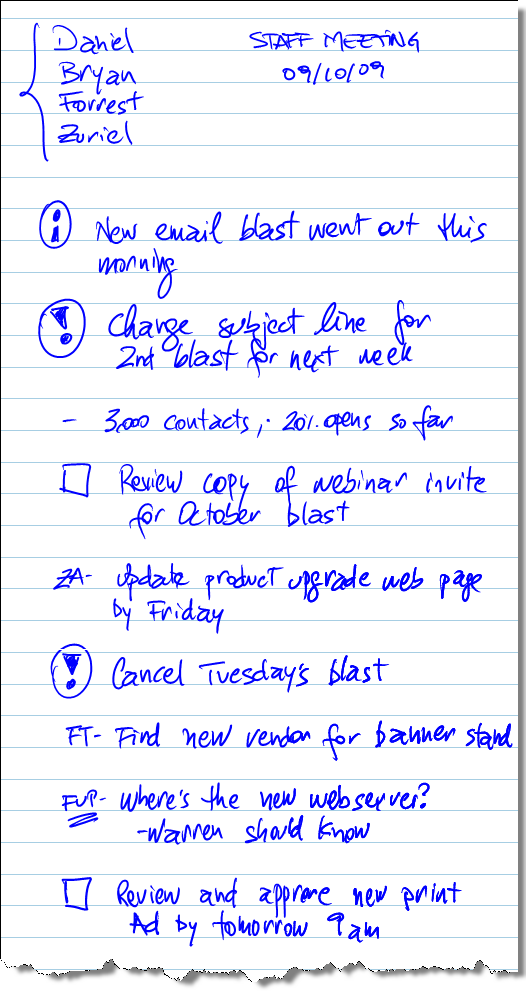
l have learned the hard way that unless I take good notes during a meeting, I cannot be very effective afterwards and therefore the meeting ends up being a big waste of time. When discussing a new campaign, the direction that the new ad should take, and the pages we need to update on the website I have to be able to identify the following items after the meeting:

  1. What was discussed
  2. What decisions were made
  3. What action items were decided
  4. Who will do what by when

The best way to turn meetings (which are, unfortunately, inevitable) into productive time spent with the team, is to take effective notes. During note taking I try to write only key pieces of information (and not to simply transcribe what was said) and place symbols next to each one that helps me easily and quickly identify what is important.

Here are my identifiers:

  • The letter “i” in a circle: Informational only. Something that was told to give context, specific background information or other piece of data that I don’t have to do anything about.
  • An empty square [  ] (empty checkbox): Action item assigned to me.
  • An exclamation point “!”: Important information or decision made that I have to remember or that affects an action item.
  • Someone’s initials: Action item assigned to someone else.
  • FUP”: something I need to follow up on. Usually a task assigned to someone in my team that I need to check the status.

These are the most commonly used symbols during my note taking, and sometimes I add a couple more (asterisk, pointing arrow, circles, etc.) depending on the note. The key for me is to be able to review my notes and act on what needs to be done.

When I have to create meeting minutes, this system helps me to go through my notes quickly and identify things that should be in the minutes versus superfluous stuff. For the action items assigned to me, the first thing I do when I get back to my desk is open my Outlook and create Tasks for each one. This way I capture all my to-do items quickly and am ready for the next item on my agenda (usually another meeting).

Since I use a tablet PC (currently an HP Pavillion Tx2500), my notes are electronic and I can easily go back to them and search for them. Below is a sample meeting note with my system, I hope it gives you a better idea of how I use it.

What is your system? Please share!

Sample Meeting Notes

Example of how my symbol system for note taking works.


The Fun Theory: How to Change Behavior

November 30, 2009

How do you change people’s behavior? Corporate America usually relies on some form of compensation system which basically uses a reward/punishment method that tries to coerce people into doing what the company wants. You have to fill out forms, get approvals, and meet goals otherwise there’s no pay raise or bonus. In other cases you try to get website visitors to navigate a certain path by placing links in strategically important places or enticing them with an offer. Books and theories exist on how to get people to perform their best or to change the way they behave (“Bringing Out The Best In People” comes to mind) but rarely we see those in action.

Volkswagen launched what became quickly a viral campaign with emails being forwarded, youtube videos with over 1 million hits and comments from all corners of the web. They call it The Fun Theory (www.thefuntheory.com) and the goal is simple: using fun to change people’s behavior for the better. The videos on their website (embedded below) are some great examples of what they mean.

How are you changing your customers and your prospects behavior? Can you make something fun that will entertain and educate them? And how about your staff or your company’s employees? Some food for thought.


The Six Minutes Challenge

November 16, 2009

Presentations can be boring. Yes, I believe you are nodding as you read this. You have sat through your fair share of hour-long PowerPoint displays that were accompanied with a not so good speaker. What if you could change all that and have the message, whatever is was, delivered to you in six minutes and forty seconds?

Welcome to the world of Pecha Kucha.

I recently attended the Business of Software conference where I participated in a Pecha Kucha competition. The rules are you have to present 20 slides with 20 seconds for each (total of 6:40). Sounds easy and I thought so too when I signed up for it, but is far from a walk in the park.

To present well in this kind of format you have to rehearse very well. More than your typical “and in this slide I will talk about X”, because since the slides are automatically timed, your delivery has to be on time all the time. What if we could change the way our companies treat presentations and just give everyone six minutes to tell their stories? We would certainly have shorter meetings and maybe better content.

So next time you prepare a presentation, think about how you’d do it if you had only 6 minutes. What is essential? What is just fluff? How can you present in a way that will engage the audience? Less is sometimes better.

Are you ready to present? 3…2…1… Go!


Suit over Gartner’s Magic Quadrant Big Marketing Ploy

November 6, 2009

In an earlier post I wrote about ZL Technologies lawsuit over Gartner Group’s Magic Quadrant, over what it considered “multitude of illegalities”.

And not surprisingly, the judge dismissed it.

Gartner’s comment about the decision focused on them being an independent research organization and denies they use “pay for play” in the publication of their reports.

So this should be the end, right? ZL lost and will go back to its corner. Well… not so fast! The way I see it, ZL had a minor victory here. Let me explain. Had the judge sided with them, the win would surely have been better but I have to think that they knew they didn’t stand a chance. So why go through the trouble? Because ZL can use Gartner’s arguments against itself and now have it documented by a judge to prove it. As they had stated on their website they were hoping to use the proceedings to get :

  • Fair Disclosure on Conflicts of Interest
  • Fair Disclosure on Evaluation Scores
  • Better Oversight

They won’t get better oversight (and that was a real stretch) but they did get from the arguments (which are now documented) that the Magic Quadrant is nothing but Gartner’s opinion about the market and not “hard facts” as some might believe. In recent emails they have started using this as proof that “(…) the market should take note that the defense on which Gartner prevailed was its argument that its reports contain ‘pure opinions,’ namely, opinions which are not based on objective facts”.

So how’s that for a comeback? I see as a great opportunity to market themselves and when talking to CIOs and decision makers that bring up Gartner’s MQ, they can simply point them to the result of the lawsuit and say “listen, as much as you like Gartner’s Magic Quadrant, it is pure fabrication based only on their opinion. No hard facts. They said it themselves! So forget about it and let me show you the demo….”.

But how will ZL be viewed in the market? Can their tactic backfire? It seems that some people have already tweeted to this effect. Now is time for them to be very, very careful with the community they target.

Keep tuned because ZL can still come back to fight the court’s decision.


The Enemy of Productivity

November 4, 2009

Did you get anything done today? OK, maybe is still too early in the morning, but how about yesterday? If you are anything like the typical worker, you can probably list a few things you’ve accomplished such as:

  • read emails
  • responded to emails
  • sent emails
  • deleted emails

See a trend here? If sometimes it feels like email is running your day, then you are not alone. The BBC reported that one third of office workers suffer from email stress, which I find interesting because email doesn’t really cause stress. It is how you deal with it that is the root cause.

On a previous post, I discussed some productivity boosters for those trying to manage the daily flood of emails, and this amusing chart (below) from HR Management reminded me of the constant struggle we all have when it comes to increasing our productivity while keeping our stress level low.

Email Stress and Productivity

Stress vs. Productivity from http://www.hrmreport.com

If your office is anything like mine, your colleagues send you Youtube videos, web links, and other stuff that although very entertaining doesn’t help you get your projects done on time. Have you ever tried simply not checking email? The chart above shows in a funny way that you sometimes feel more productive when you are checking email, and that you may turn to it if you get bored, and from personal experience I have felt the same way.

Think back to your daily activities. When are you usually checking email? Is it the first thing you do in the morning? Right after lunch before you decide to finally tackle that week-old project? Are you using email to get your adrenaline up like a junkie?

Just close, shut down, disconnect and ignore your email for about 1 hour. If you are feeling extremely brave, then try going for 2 straight hours. That’s right, and no peaking! Ignore the email and focus on work. I bet you can get some stuff done today.

Some of my favorite tips on email productivity are:

What is your stress level today? Close the email and ask yourself again in 1 hour.


Killed By Powerpoint

August 25, 2009

Have you ever had the sensation of being killed, slowly and mercilessly, during a boring presentation? No need to raise your hand, we all have been there.

Why is it that such a poweful tool can be so deadly? An interesting article sent to me (thanks, Z.) talks about the birth of what we know today as PowerPoint. Happy 25th birthday!

The article from BBC News UK can be seen here: The Problem With PowerPoint

Over the years I’ve read a number of books on effective presentations, listened to podcasts, and attended some presentations and webcasts. It all boils down to:

1. Know your audience

2. Know your subject

3. Create a story to tell

4. Rehearse

5. Rehearse once more

Although no magic bullet exists, we can all do better next time we are putting a slide deck together. Simply remember the last presentation you attended and how boring it was, and swear you will not put your audience through the same experience. That’s a good start!

What has your experience been with powerpoint?