The Enemy of Productivity

November 4, 2009

Did you get anything done today? OK, maybe is still too early in the morning, but how about yesterday? If you are anything like the typical worker, you can probably list a few things you’ve accomplished such as:

  • read emails
  • responded to emails
  • sent emails
  • deleted emails

See a trend here? If sometimes it feels like email is running your day, then you are not alone. The BBC reported that one third of office workers suffer from email stress, which I find interesting because email doesn’t really cause stress. It is how you deal with it that is the root cause.

On a previous post, I discussed some productivity boosters for those trying to manage the daily flood of emails, and this amusing chart (below) from HR Management reminded me of the constant struggle we all have when it comes to increasing our productivity while keeping our stress level low.

Email Stress and Productivity

Stress vs. Productivity from http://www.hrmreport.com

If your office is anything like mine, your colleagues send you Youtube videos, web links, and other stuff that although very entertaining doesn’t help you get your projects done on time. Have you ever tried simply not checking email? The chart above shows in a funny way that you sometimes feel more productive when you are checking email, and that you may turn to it if you get bored, and from personal experience I have felt the same way.

Think back to your daily activities. When are you usually checking email? Is it the first thing you do in the morning? Right after lunch before you decide to finally tackle that week-old project? Are you using email to get your adrenaline up like a junkie?

Just close, shut down, disconnect and ignore your email for about 1 hour. If you are feeling extremely brave, then try going for 2 straight hours. That’s right, and no peaking! Ignore the email and focus on work. I bet you can get some stuff done today.

Some of my favorite tips on email productivity are:

What is your stress level today? Close the email and ask yourself again in 1 hour.


What’s Your Marketing Approach?

July 29, 2009

An interesting post by Steve Johnson talks about marketing not being a list, but rather an approach to solving customers problems and helping buyers to buy.

As marketers, we sometimes fall victims of the routine day-to-day tactical activities and forget why we are doing them. Create this email here, prepare a webinar there, and send the artwork for publication in that magazine. Do you ever stop at some point during the week to rethink your actions, rethink your role, rethink your strategy?

Being tuned to the market and being able to notice patterns is only possible if you do your job with eyes wide open. You don’t necessarily have to keep looking for this with everything you do at every minute (it would drive you crazy and slow you down considerably) but just recognizing the need for it does help.

Here are some actions you can take that might help:

  • After you create a presentation, review it thinking not only on who you will be presenting it to, but now thinking about whether more people in your market (customers and prospects) would find it interesting/educational
  • When you wrap up things for the day, think back at everything you created (collateral, presentations, copy, etc.) and make a note to revise it and expand it to become a piece you can repurpose for another audience
  • Make a point to touchbase with the sales reps every month and ask them what they are seeing in the market and what questions they are being asked
  • Schedule a couple hours per week (Friday afternoons are usually great) to review the week that passed and to plan for the week ahead, with the idea that what you will be working on, producing, and publishing should be solving a customer problem

How are YOU tackling the challenge of noticing patterns and solving customers problems?


Free Stuff That Sells. Maybe.

June 13, 2009
Free Marketing Stuff Can Sell

Free Marketing Stuff Can Sell

As marketers our job is to generate brand awareness, educate our prospective customers on the benefits of our products and get them to purchase. Effective marketing is about generating sales. Sure, leads and nurturing and all of that are all good but the reality is that unless a sale is made, all that money was spent without any return. Part of the challenge is reaching enough people with your message so that at least a significant number of them decide to buy. And how do you reach even greater number of prospects? Give away free stuff.

Can free stuff sell?

There is a natural resistance among marketers to give whitepapers, webinars, even product spec sheets out for free, especially without requiring any kind of registration. We want names, titles, email addresses, phone numbers, company revenues, number of employees, and while we’re at it give us your annual budget too. What do we do with it? We send it along to the sales reps so tat they can chase these “leads” like eagles diving for their prey. Eagles rarely come back empty handed, though. But that’s another story.

Back to the free marketing stuff. I am enrolled in a free course called Inbound Marketing University, created by HubSpot. It is a free week long online training program featuring some great speakers on topic such as blogging, SEO, viral marketing, email marketing, lead nurturing… all the tools online marketers need to know.

So, why is it free? Because if they charged for it not as many people would register.  Also, the classes (delivered via online webinars, with the archives available afterwards) feature speakers from other respected companies that would love to be able to sell their products to the attendees. I’m not saying that it will be sales pitch university, but I am skeptical. Will it really have all the great insight you get from quality paid courses? Will I get sales calls from each company that is presenting a class? I sure hope yes for the first and no for the second.

As an attendee the question is whether the content will be good. As a marketer (HubSpot in this case) the question is whether sales will follow.

Free marketing that sells

Free marketing stuff can definitely help a company improve its brand and get new customers. People love free stuff, and if it is quality free stuff that you don’t have to regiser for they will tell more people to check it out and those people will tell even more people (viral marketing anyone?). Odds are that someone may eventually buy the product or service. David Meerman Scott is a master at this. His eBook “The New Rules of PR” was offered for free without requiring any registration from his website and was downloaded 250,000 times. When he came out with his hardcover book “The New Rules of Marketing & PR”, it reached number 1 in sales quickly. When people download his eBook and like it, they are more likely to purchase his new book. On top of that, by recognizing David as an expert on the subject and someone that is not emailing you every week with stuff you never asked for, he and his company (Pragmatic Marketing) may get some customers that otherwise would not have even thought about them.

And if you do a simple Google search, you’ll find tons of other free stuff that does not require registration. From free PPC tips, free guide on Facebook for business, free eBook on Twitter for Business, free email marketing guide, and other miscellaneous free stuff (some of which you wish you had never found).

Does it mean we should all offer free stuff without registration on our websites? And how about going a step further and forgo registration for everything else we have on the site, just let people take it? Of course not, but putting some thought into getting quality content available without too many hurdles for the users couldn’t hurt either. Going back to the Inbound Marketing University, what I liked about their registration process is that it was painless, they ask minimum information and so far only relevant emails about the course have been sent.

Whether Inbound Marketing University ends up delivering a great program or just more sales presentations, I will let you know throughout the week as I take their classes (probably more archive classes than live ones, for my free time during the day is fairly limited). The free offer has at least picked my interest so you could say that the strategy is working… for now.

Does free stuff appeal to you? Or you try to stay away from it? Do you offer free marketing materials without registration on your website? Please share your experiences! 🙂


Better Time Management with Smart Calendars

March 12, 2009

Use your calendar to your advantage

Smart calendar done right

Using calendar the smart way

I’ve noticed throughout the years that if something is not on my task list it won’t get done. Yes, I may remember the task from time to time and I write it down in a yellow sticky note, but getting it into my task list (be it in Outlook where I centralize everything, or in a paper notebook that I used back in the day) triggers some type of psychological commitment that is not the case otherwise. And besides, once is in my task list (I use MS Outlook to manage my tasks, see my post on Task Management with Outlook), I can then prioritize and classify accordingly.

But the other side of getting stuff done and being effective at managing your time has to do with meetings.  Seth Godin says there are three types of meetings: 

  • Information: designed to inform
  • Discussion: where the leader wants feedback
  • Permission: where the other side has the power to say ‘yes’ or ‘no’


Although I think he simplified a bit (I can think of at least 3 other types that are not covered there, but that’s a post for another time), I get his point. Unless you know what the meeting if for, you won’t be prepared for it, and you won’t have a very productive meeting. Unproductive meetings are a drag on your time and therefore on your ability to be a better manager. The subject of running effective meetings has been discussed in several other blogs so I’ll focus at the narrower topic I outlined in the beginning, which is managing your time via smart use of your calendar.


The Five Rules of Effective Meeting Scheduling

For those of us networked and connected to a calendar system such as MS Outlook, we have the advantage of being able to share our calendars with the rest of the company. That is also, of course, a drawback in some cases because everyone with access to your calendar can now see when you are available and when you are out playing golf, I mean, when you are in an important meeting.

But seriously, I think that the networked calendar has more advantages than disadvantages if you know how to use it. Try following these simple rules:


1.       Make your calendar available to your direct reports and your peers: companies differ on their network policies and who has access to what, so you may not need to do this but just in case your company locks down access to other people’s calendar you should proactively let your direct reports (those who work for you) and your peers see your schedule. This will help you in two ways. For one, your staff can now see your availability and schedule necessary meetings directly into your calendar without having to keep asking you, which saves you time once you let them know of your particular preferences (i.e. don’t schedule meetings in the morning, or whether you prefer to leave at least 1 hour after lunch before any meeting, etc.) and secondly, if your peers have access to your calendar, you can also avoid calls and emails back and forth asking “hey, are you available at 2pm tomorrow to discuss Project X? If not, give me a couple of days and times….”. Let them see your availability and let them Mischedule the meeting accordingly. This is a GREAT time saver.

In order to give other people access to your calendar in outlook, do the following (Outlook 2003 and 2007):

  • Go to “tools – options”
  • Click on “Calendar Options”
  • Click on “Resource Scheduling”
  • Click on “Set Permissions”
  • Click on the “Permissions” tab
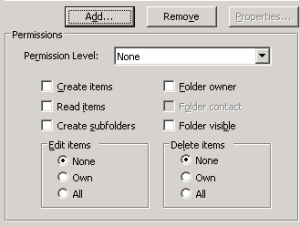
  • Click on the “Add” button, the contacts list will open upAdding Permissions to Your Calendar
  • Select the person you’d like to add to your permissions list and select from the drop down list of ‘Permission Level’ the type of role that user will have. As you click each role, you will see different options below being checked off. You can also customize yourself the role if the default ones don’t fit. For people to be able to view your calendar items they need to have “read items” checked. If you want to give people the ability to create calendar items (meetings) directly into your calendar, they also need “create items”. I usually only let my staff with “read” permission because I want them to send me a meeting invitation before they schedule something directly to my calendar. 

2.       Don’t simply ask people to come to a meeting by calling or emailing, send them a meeting invitation: Most calendar programs have this option, which emails the person with a meeting request that they need to reply to with “yes”, “no” or “propose another time” (those are the standard options in MS Outlook). This way you ensure they accept the meeting (which will automatically add it to their own calendars), and you can track who responded (I know this works well in Outlook but not sure in other platforms).

3.       Use the body of the ‘meeting request’ invite to add agenda items, links to documents, and other notes so that people can be prepared prior to the meeting.

4.       In your calendar, ensure you have some time blocked prior and after the meeting: This may vary depending on the type of meeting, but you may have to prepare or read the agenda or even collect information. As soon as you invite or accept a meeting invitation, decide whether you need some extra 15 minutes (or more) to prepare. The more prepared you are, the more productive your meeting will be especially if you’re running the show. Block that time prior to the meeting in your calendar as if it was another meeting adjacent to it. The same applies for the ‘after meeting’ time… if you were taking notes and have to prepare meeting minutes or if you know the meeting will give you a bunch of action items, you should allocate some time right after the meeting to transcribe your notes or assign tasks.

5.       Label the meeting appropriately in your calendar: MS Outlook users have some nice options here that few people bother to configure, which is a mistake. Lotus notes users can do the same thing and I bet other platforms have similar functions. In MS Outlook 2003 and 2007 you can color code your calendar items so that you can visually identify types of meetings scheduled throughout your week or month. I like this feature because when planning my week I can easily spot a day in which I have several conference calls and may want to schedule an extra call at another day (we all need a break from conference calls, right?) or vice versa. And here’s where I think you need to go a bit deeper than what Seth Godin recommended as types of meetings, because you will want to clearly see stuff such as:

a.       Off site meetings: for these you will need to allocate travel time before and after the meeting (going to and coming back to the office).

b.      Meetings that involve a conference room or other facility: my company has a video conferencing room, so I know that if have a meeting that will use that room I need to be 10 minutes early to ensure the system is turned on and working, so I like to see these types of meetings with a different color.

c.       Meetings involving your boss: you want to continue climbing the corporate ladder and so you should know not to arrive late at these and ensure you are prepared.

d.      Project specific meetings: you could have a category for specific project types (webinars, advertising campaigns, creative brainstorming, etc.) if those represent different preparations, time, or energy level required.

Want to start labeling your meetings? If using MS Outlook 2003…

a) Open your calendar

b) Right-click on any meeting and in the contextual menu that opens up click on “Label”.

Labeling meetings in MS Outlook 2003

Labeling meetings in MS Outlook 2003

c) You’ll see the default labels with colors showing up. At the very bottom of the labels list, there’s an “Edit Labels…” option.

d) Click there and a window will pop up showing all labels and allowing you to edit each entry.


If using MS Outlook 2007, you are lucky! In Outlook 2007 they got smarter and merged the labels from the Calendar with the categories from the Tasks. This means you can now share the same categories between meetings and tasks. Simply…

a)Open the calendar

b) Right click on a meeting

Creating meeting categories in Outlook 2007

Creating meeting categories in Outlook 2007

c)Select the “Categorize” option

d) A list will show up and you can click on “All Categories” which will bring up a window with all categories, colors, and options to add or modify existing categories.

6.       Bonus rule! When you get an email asking for you to go to a meeting (someone who clearly doesn’t know how to use the meeting invitation feature), simply click on that email and drag it to your Calendar icon (works in MS Outlook 2003 / 2007) and voila! A new meeting window will open with that email’s info in the body of the appointment details. Right after you do this, delete the email.


Know What Your Meeting is About

Labeling or categorizing your meetings can help tremendously in managing your time effectively. The types of categories will depend on the types of projects you’re involved in, the energy required in each type of meeting, and basically what you think will make sense. Start with a couple and you’ll see really quickly if you need more. My meeting types are:

  • Off site meeting: I like to know if the meeting will require me to drive to it, so I can plan accordingly and not schedule something right after it
  • On site meeting: for regular meetings held with my staff or in / around my office
  • Conference call / video conference meeting: for meetings that will require some setup and more preparation
  • Travel required: this means air travel and I use this to allocate my time going to and from the airport as well as time that I’m on the plane (this way no one will schedule a meeting for me while I’m 10,000 feet in the air and wonder why I didn’t show up)
  • Webinar: I have to personally oversee the setup of webinars we conduct so I need to tag these meetings accordingly
  • Work time: for certain projects, tasks and even working meetings with my staff I like to block some time to ensure we’ll get to it, so I created a category for “work time”.
  • Personal: going to the doctor, picking my son up from daycare and other chores that are not work related

Be smart at scheduling meetings and use your calendar to your advantage.

If you’re looking for some more tips (especially MS Outlook users) on meeting scheduling and best practices, check out this blog: http://www.theproductivitypro.com/blog/?cat=23

Of course, if you still have too many meeting to manage and that is what you think is killing your productivity, then you may want to read this interesting blog from Lifehack about killing your meetings


Enjoy life!


Getting Stuff Done with MS Outlook

February 25, 2009


Note: the tips I give below work in MS Outlook 2003 as well as 2007 version. Outlook 2007 has even more features for helping you categorize stuff, but we’ll keep it simple for now and focus on the features available in both versions.

An Effective Marketer gets things done. He is known for his ability to complete tasks, get campaigns back on track, measure and make course corrections in a timely fashion and still handle responsibilities that are not even in his job description.  How does he do it? With focus and by tackling one thing at a time. 


If there is any one “secret” of effectiveness, it is concentration. Effective executives do first things first and they do one thing at a time.

  Peter F. Drucker, “The Effective Executive”


If we could just create our plans for the year and stick to them without having any additional requests or emergencies come up after that, life would be perfect. But no! Stuff keeps happening. Meetings here, there and everywhere taking up precious time, emails that keep coming, voice mails that keep getting through, and those pesky employees that just can’t function without direction. Life could be good, indeed, if you lived in an island alone. But since you’re reading this, odds are the life in an isolated island is out of your reach. So let’s at least try to get some stuff done, shall we?

Concentration is the main thing, as Peter Drucker said, but in order to focus you need to know what to focus on. Should you check out that email from the CEO that just came in and stop revising the ad copy? Or should you get to the action items discussed during the last staff meeting? Aha! So many things taking your time and attention that you can’t focus, huh? The answer is to first get organized.


Organizing your tasks Outlook Task Manager


There are several methods of organization being one of the most popular with technology folks the GTD (Getting Things Done) system. But whether you subscribe to GTD, to Autofocus, ZTD, Covey’s 7 Habits, or any other system you need to have a way of organizing and creating action items/tasks. That’s the core of getting stuff done and being productive. Some people like paper and pencil and carry notebooks around with them, pages filled with meeting notes, reminders, etc. Others use PDA’s , their iPhone, or a computer.   What most don’t realize is that they probably already have a pretty good tool for helping them organize their tasks, prioritize, and take action. That’s MS Outlook, used in most corporate settings to handle email but not fully understood from a task management perspective.


Getting to Know MS Outlook

First time I tried to use Outlook for more than email and calendar, I really didn’t like it. But I also had no idea of how to use it properly, I was just creating tasks and forgetting to check back on them and spent more time looking for a particular task than actually doing work. Well, those days are over because I realized that if you want to use Outlook for task management, it can actually be very effective. You can even incorporate GTD characteristics to make it more functional.

First: create categories

A light bulb went on in my head when I read Getting Things Done and he talked about creating a tickler folder and different categories for stuff. Common sense, obviously, but it just helped me see my workload in a different way. 
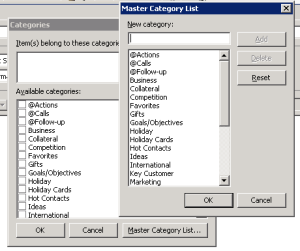
New Task Categories

So now in Outlook I have multiple task categories such as “Action” for things I need to personally work on, “Follow-up” for items that need to be checked upon later, “Calls” for calls I need to make, etc.  I also have categories for the type of work that needs to be done, for example “Collateral” for all work related to marketing collateral, “Website” for all

 website related stuff, and so on. This helps me because I can either check on all “Action” tasks and then check on all “website” related tasks and prioritize.

The default task categories in Outlook are OK but you need to create your own set of categories. When you create a new task, click on the ‘categories’ button at the bottom of the new task screen and then click on the “Master Category List” button. You will now see the ‘master’ list and will be able to edit, add, or delete categories.

Second: Decide on top categories

OK, now that you have categories you will be able to get all stuff you need to work or get done assigned to a category, or even multiple categories. Let’s say I need to review the copy for a new spec sheet. I will assign this task as “Action” (because is something I need to work on) and also assign it to “Collateral” (because is related to collateral materials). I like this ability to multi-tag or assign multiple categories to tasks, it can come really handy.
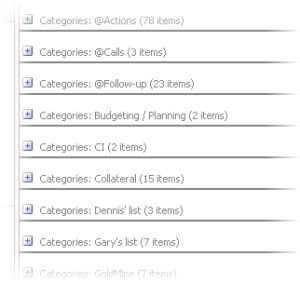
Task List in Outlook

But wait, there is more! Simply creating categories is not enough. Decide on your top categories, the most important ones. These are the action-related categories, such as “Action”, “Follow-up”, “Call”, etc. those generic but action-oriented categories (and not the specific “Collateral” or “website”, etc.) are the ones that will help you get stuff done. If 

a task is under “Website”, you don’t know whether is something that requires you to work on, to follow-up on, etc. but if a task is under “Follow-up” then the goal is clear. And you want these action-oriented categories to appear first on your Task Manager screen. Simply edit the category name and start it with an @ symbol. This will make it come first when you sort your tasks by categories (which you should always do). This way you have displayed first the action items in their respective categories.

Third: Create VDP Lists

After leaving voice mails for another manager for a week, he finally calls me back to see what I needed and I only have 10 minutes before he jumps on another call, and I have to scramble to go through the emails I sent him or look back at some notes I took to get the list of things we needed to discuss. And usually I forget one or two items. By creating the “@Follow-Up” task category I was then able to add tasks to follow up with that manager on a number of different items and be more prepared for when I finally was able to catch up with him, but still that required to browse through a list that contained not only follow-ups with him but with other people as well. That’s when I started creating VDP lists (for “very difficult people” to get a hold off). These are categories that have that person’s name, like “Jonn’s List” or “Mary’s Lists”, etc. When there’s an action item that requires me to check with them or follow-up with them, I can add that task to that person’s specific list and when I am finally able to get a hold off them, I open that category in Outlook and go through the task items.

Instead of the VDP list, you can also create one for different projects (Tasks associated with Project ABC that need to be discussed during the status meeting every other week) or for a specific meeting that’s held every month. Let’s say you have a staff meeting or a management meeting where managers of all departments get together to discuss several items. Well, as you wait for the next month’s meeting, you can start allocating items in task manager for that specific category, let’s say “Monthly Management Meetings”.  Now, before GTD zealots and the like start picking this idea apart, remember that sometimes the action you need to take is simply “bring up idea about xyz during next management meeting”. So if you can capture that item and properly categorize it, you will be ready when time comes.

Fourth: Prioritize Your Tasks

Where some of the productivity systems fall apart is on the prioritization part. Simple to-do lists fail because you never seem to be able to get through all those items on the list, in fact at the end of the day the list has grown even more! And for all good that GTD, Covey, and other systems give you they never get into too much detail about how do you decide what you should do first. Yes, that’s where YOU have to start making decisions based on your goals, your availability, your resources, and on what’s important to you. Deciding what’s important and what’s urgent (as Covey likes to put it) is a critical thing if you want to become effective, but is also subject for another post. Let’s just assume for now that you know what needs to be higher and lower priority, so you need to get your tasks in Outlook to reflect that.

If you simply create a new task and give it a category, let’s say “@Actions”, you will have a bunch of tasks under that category. Which one do you do first? Well, if you follow GTD or 7 Habits you will (and should!) stop at some point during the week to evaluate your tasks, your state of mind, your soul and what you need to do in the next few days. This is when you stop ‘doing stuff’ and go to ‘processing stuff’, which also means that at the end you need to 
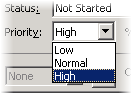
Outlook Task Priority

prioritize.

So either you do this each time you create a task or when you stop to evaluate your time and open each task and assign it a priority. Outlook gives you “low”, “medium” and “high”. Now you not only have tasks associated with different action-items (follow up, call, etc.) but you have prioritized them.


Go to “View” menu, select “Arrange by”, “Current View”, select “Customize Current View”. Make sure that “Group by” is “Categories (ascending)” and in the “Sort by” click and select it to be “Priority (descending)”. This way your Task Manager view in Outlook will show all tasks grouped by categories with higher priority tasks showing first within the categories.
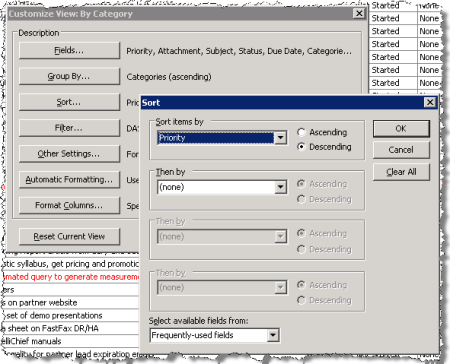
Outlook Custom Task View

Get Stuff Done This Week

If you need another yet another layer of prioritization, you can also create a category called “@@This Week” (the @@ signs will guarantee it will show up on top as the first category, make sure to configure the “view” to group by categories though) and as you go through your task list on a Friday afternoon or before you start work on Monday, you can look at the high priority tasks in each category and also assign it to the “@@This Week” category. When you’re done with one task you can simply go back to MS Outlook Task Manager, look at the next task listed under your This Week category and get it done.

Capture Tasks All the Time

As I explained in a previous post, you can simply drag email messages to your Task Manager icon in Outlook (works for Outlook 2003 and 2007) and that email will become a new Task Item. Easy, simple, and efficient! Also don’t forget the killer CTRL+SHIFT+K keyboard combination that will create a new task item wherever you are in Outlook. As you get emails, make sure you process them and if there’s an action that needs to be taken, use the proper categories and prioritization.

If you want to know more about processing emails, getting your inbox empty, and working more productively you should definitely check out 43Folders and their “inbox zero” series of articles and a great Primer on the GTD system is the blog post at 7Productions.

Next: Is your calendar working for or against you? Some simple tips for MS Outlook Calendar that will help you become more productive.


Only One Thing Matters in Online Surveys – WIIFM

February 16, 2009

Marketers have several tools at their disposal in their arsenal of marketing weapons, one of which is surveys. You can’t be a marketer without having done some surveys in your life, otherwise where will you have gotten  your data from? How did you target and fine tune your messages?

With the advent of cheap online survey software, everyone it seems is creating and sending out surveys. The good surveys, or should I say effective surveys, are the ones that get people to fill them out giving you enough insight into their market/purchasing process/buying habits/etc. that will positively affect your campaigns.

Marketing guru Seth Godin has recently posted a short but very good list of how you can make better surveys, but he misses one very important point. WIIFM (What’s In It For Me?). That’s what the reader will be asking herself as she reads and opens your survey.

The benefit to the survey respondent needs to be obvious. Sure, in some cases people may respond simply because they love your company/brand and that’s great, but you should also strive to get those who are not necessarily loyal customers to respond, otherwise the survey may end up not telling you the whole truth. What will they get out of it? There are several options:

  • Prize drawing (like an iPhone or other gear)
  • Cash (or gift cards)
  • Book
  • T-Shirts and other corporate branded giveaways
  • Knowledge

Of all the possible offers, Knowledge is probably the most enticing. Sure, if you give away a brand new tech toy people will likely get excited about the possibility of winning it, but if you give away Knowledge you will have an even better chance of impressing the respondent. This knowledge can come up in several different ways, such as a compilation of the survey results, a more personalized benchmark of your questions versus the survey population, a whitepaper about the subject at hand, and many others. Few people do it this way because it takes time and money.

Regardless of what you are offering (and the offer should vary based on your target population for the survey, your industry, etc.) you will be far more successful if you think in terms of WIIFM – make it attractive enough that they will want to spend a few minutes answering your questions.


Effective Marketer Principle 7: Run Productive Meetings

January 25, 2009

Meetings are a necessity of today’s work environment. And are also good source of humoristic material (see Dilbert cartoons) for the fact that they are often badly run and take way too much time. If you have ever asked yourself the following questions during a meeting, then is fair to assume the meeting wasn’t productive at al

  • Why am in this meeting?
  •  Why are all these people in this meeting?
  • Why are we meeting?
  • Haven’t we already discussed this in another meeting?
  • Shouldn’t [name of person] also participate in this meeting?
  • What are we trying to accomplish?
  • Who did we decide will take care of the action items?
  • Will anyone notice if I slip out of the room before the meeting ends?

So it is no surprise that one of the principles for effective marketers has to do with productive meetings. Drucker, of course, was right on target when included this principle in his article for effective managers (“What Makes an Effective Executive”, Harvard Business Review, June 2004) since one of the most important aspects one should be able to master in order to become effective is time management, and meetings are, as a general rule, a time drag.meeting1

Following Drucker’s advice, you should first identify what type of meeting is needed, since different meetings require different kinds of preparation. There are meetings to prepare a statement or press release, meetings where team members report the status of their tasks, meetings to inform other executives, and so on. From a marketing perspective, the principle still holds true and you will certainly be able to recognize in your organization all those different meeting types and should be able to prepare beforehand and run them according to their individual characteristics. For example:

Meeting to discuss campaign goals and strategy: this meeting should require attendees to be prepared beforehand by knowing the target market the campaign will focus on, reading results from similar campaigns or from campaigns targeting the same market, and assessing competitors’ actions towards the said market. If this kind of preparation is expected and understood by all participants, the meeting itself will be more productive since everyone will be able to come prepared to discuss the strategy rather than basic principles and background data.

Another example might be a meeting to review artwork, design, or other conceptual diagram related to marketing collateral or advertising. The requirements for this meeting differ from the previous one in the sense that previous preparation may involve having everyone review the proposed artwork or design beforehand and come prepared to the meeting with their observations. The meeting itself can be run also more focused on the specific artwork/design at hand, discussing that element in detail and how it relates to the overall message.

Finally, let’s take the example of a marketing staff meeting where you will review the results of the last quarter campaigns with the team. The way you will run this meeting will undoubtedly differ from the two types of meetings described above.

The takeaway from this principle is that once you realize that each meeting has its own purpose and structure, you can start organizing, preparing, and running meetings more effectively. But regardless of the type of meeting you will have, my personal experience is that you need at least the following:

  1. An agenda:  prepared and distributed prior to the meeting.
  2. An assigned note-taker: someone everyone agrees will write notes during the meeting, avoiding the all too common “oh, I thought you were taking notes so I didn’t take any!” problem.
  3. Published action items: sometimes referred as meeting minutes, it really doesn’t matter what you call it as long as it contains clear action items from the meeting, indicating who will do what by when. The note-taker is the person usually responsible for putting together the action items and sending it to everyone (after all, that’s why he was taking the notes!)

 Sounds simple and it really should be. Don’t let other people take you down with their useless meetings, you have more important things to do. Instead, teach them how to run effective meetings!


Effective Marketer Principle 5: Take Responsibility for Communicating

January 17, 2009

To get things done you need to communicate, ensuring the team is aware of the plan, deadlines, and expected results. Effective managers in general are good at taking the responsibility of communicating their decisions to the organization, ensuring everyone is on board and aware of what will happen. As you discuss the plan of action with your team and with the stakeholders (see previous post), you are also getting buy-in for carrying out the tasks. In marketing is especially important to ensure that the company as a whole is aware of what is being done. Marketing, after all, affects every part of the organization.

In big companies as well as in small ones Marketing can oftentimes be considered a necessary expense, the department where money gets spent without consideration and where results are difficult to be measured. If this looks familiar to you, then you need to start practicing Principle 5 of the effective marketer and start communicating what you do, why you do it, and how it impacts everyone.Communicate the Marketing Plan

As the marketing plans are shared with the rest of the company, and details on why each campaign or activity is being carried out together with their expected impact on operations and sales, the reason for marketing and why we have this department should become clear. Marketing is not just a concentrated effort from the staff in that department, it should be part of every employee’s responsibility. The business cards that are presented to partners and potential customers are part of marketing branding, the message being delivered about what the company does is tailored and perfected by marketing, the collateral material that is distributed and that sales people use at trade shows and site visits is also marketing, of course. Therefore an understanding of what this all means, why each piece is important and knowing it is part of an overall strategy helps when delivering the message(s).

The principle of communicating also applies to ensuring the marketing manager gives the necessary information to others in the company to get their jobs done. Sales, finance, operations, shipping, each department manager needs specific information that will help them do their jobs. The effective marketer knows what information they need and provides it to them (market intelligence will help sales, packaging and placement are needed for shipping, cost per lead and campaign ROI will make the CFO happy). This shows that marketing is involved in almost every aspect of a company’s operations.

Learn how, when, and to whom communicate, and you will learn how to gain support to carry out the marketing plan.


Effective Marketer Principle 4: Take Responsibility for Decisions

January 13, 2009

The fourth principle can be summarized in one word: ACT!project plan

Marketing managers can sometimes get caught up on the creation of the plan, discussing with the team everything that will be done, the campaigns, the nice webinars, the new collateral, and the press releases but forget the important part of the marketing plan, actually the important part of any successful plan: The Three W’s (Who will do What by When)?

Until there’s a clear “owner”, a task won’t get done. Is the old saying that if everyone is responsible, then no one is responsible. Drucker advises us to use the following when determining the responsibility for each task laid out in the plan:

  • The name of the person responsible for the task
  • The deadline (when does it need to get done?)
  • The names of the people who will be affected by it, especially if approvals are needed (think for example about whether the CEO, the CMO, or another high level executive needs to review and approve your ad campaign before it goes out the door. Make sure to add this person as part of your plan and also to allocate the appropriate time it will take for this person to review and approve – or not – the deliverable)
  • The names of people who will have to be informed by the decision (after you create a new piece of marketing collateral do you announce it to the sales team? Do you have to put out a press release after you revamp your whole website? Think of the communication activities that may result of completing a task)

A key part of taking responsibility and assigning people responsible for each task is to make them accountable. Metrics should be in place to ensure performance is measured – something that becomes critical if the task at hand may impact the overall results of a marketing campaign. If, for example, an activity within your plan is to send out an email blast to selected customers inviting them to attend a webinar, you not only need to ensure you are tracking the results of the email campaign (open rates, click trough rates, bounce rates, etc.) but you should also look into whether the sending of the email itself was done correctly. How? Look back and verify whether the deadlines for creating the email and scheduling/sending it out were met. Why the results were so good or bad? Results from the email might point to improvements needed for the copy, the overall design, or even the landing page used. It is important to know beforehand how you are going to measure success for each activity and also understanding the implications of not meeting the goals (maybe the email needs to be reworked and sent again to drive additional registrations).

Drucker’s wisdom also tells us about delegation and the need for de-centralizing decision making. We all have way too much on our plates to be concerned with every little detail of our marketing plans, after all that’s why we have people in our teams that (hopefully) can help us with some of the tasks. Be it an intern, a marketing coordinator, an assistant or additional marketing professionals, we need to learn that we can rely on each member of the team to carry out his or her task successfully and to make decisions along the way without having to get your approval every step of the way.

The path to becoming an effective marketer involves learning how to “let go” of having to make all decisions. You hired quality people, you should trust your team and you should coach them on how to become better at what they do so that they can one day take over your job and you can rise up the ladder as well! Make each person responsible and accountable but also give them the freedom to decide the best course of action in certain situations. That’s the only way you will be able to accomplish everything you set out to do in your plan. Quoting directly from Peter Drucker “Making good decisions is a crucial skill at every level. It needs to be taught explicitly to everyone in organizations that are based on knowledge.” (from “What makes an effective executive”, Harvard Business Review, June 2004)


8 Principles of Effective Managers

January 5, 2009

Peter Drucker fans will recognize the subtitle of my blog “Effectiveness is a discipline and it can be learned” as one of his famous quotes, and this pretty much sums up my thoughts on it. Anyone can learn how to become more effective as long as they apply themselves to it and marketers are no exception.

In 2004 Drucker wrote an article for Harvard Business Review Magazine titled “What makes an effective executive”. Eight practices are outlined to guide executives become more effective, and by “executive”, he means not only managers but knowledge workers overall. The practices are as follows:

          Ask “what needs to be done”

          Ask “what is right for the enterprise”

          Develop action plans

          Take responsibility for decisions

          Take responsibility for communicating

          Focus on opportunities rather than problems

          Run productive meetings

          Say “we” rather than “I”

It is interesting that this article differs a bit from his seminal book “The Effective Executive” (Harper Business 1993), which talked a lot about time management and decision making. Combining both sources, you have excellent material to guide you in becoming a better marketing manager.

Since those are both solid works that need to be used in your search for effectiveness, let’s tackle them in different posts. The 8 principles he outlines in his HBR article are more “action oriented”, meaning they guide you towards making the right plans for the right activity and how to behave in general.  Let’s apply them to marketing, shall we?

8 Principles for Effective Marketers

Those principles are easily transferable to marketing professionals:

Principle 1: Ask yourself “what needs to be done”?

What is your highest priority? As a marketer what is the ONE thing you need to do that will really determine whether your company will be successful? This is probably the toughest question and the most critical principle outlined by Drucker since it forces you to think through all your priorities, review your knowledge of the marketplace and of your products and offerings, then come up with that critical action that will drive all your other efforts.

Maybe you should focus on establishing an online presence, or in enhancing brand awareness, or even in creating a community of users… whatever is the highest priority that is the one you will be focusing on, the one that will yield higher results.

Interesting also to note that Drucker suggests asking “what needs to be done NOW”? When you list all your priorities, it is likely several items will be placed higher and even at the same level, but you should decide on the one that needs to be done at this moment, the critical action that can’t wait. This question when rephrased will help you focus.

Principle 2: Ask “what is right for the enterprise”?

So after you come up with what needs to be done now (your highest priority), you should make sure it fits with the corporate goals. You may very well have as highest on your list the revamp of the corporate website using the newest flash menus, blogs, and tracking mechanisms but can you link it back to corporate goals? This is key and what will link marketing to the company’s priorities.

This question is great as a discussion item between the marketing team and the top management (ideally the CEO). Where is the company headed? What’s the mission? Getting back to these basic principles can help marketing to “reset” and come up with a plan for action that will drive the organization in the right direction. So although that new website project was high on your list, maybe rethinking packaging or focusing on sales collateral is what should be done. It’s for you to decide!

 Principles 3 to 8: check back for discussion on the remaining 6 principles.

P.S.: you may be asking youself “where are all the nice tools that we marketers love to use and how do they relate to being effective”? Hang tight, because we’ll get to that real soon!